What Is the Average Lifespan of an LED Screen?
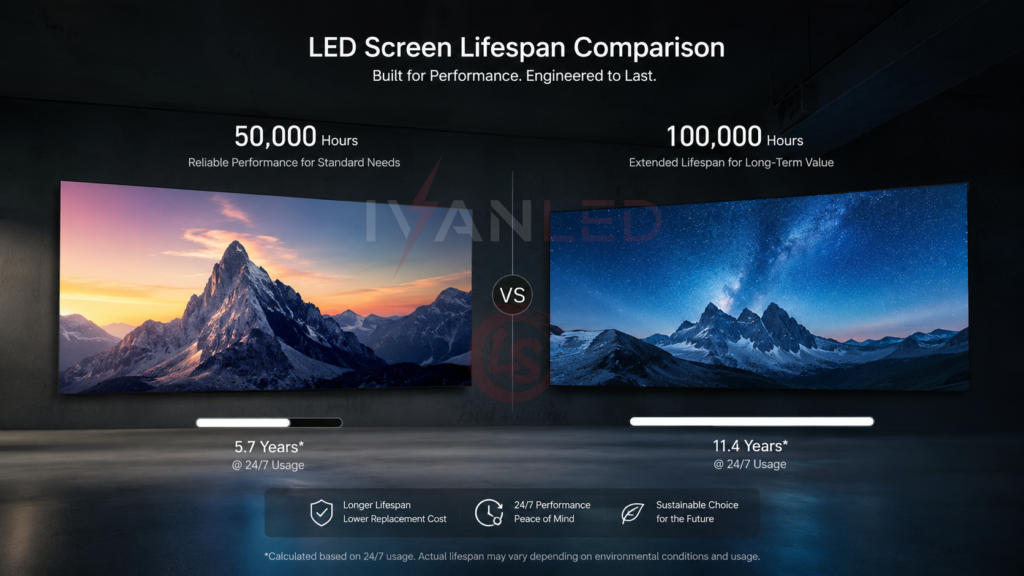
Quality LED displays typically last 50,000–100,000 hours — approximately 5–10 years of normal commercial use. This is significantly longer than LCD screens (30,000–60,000 hours) and OLED (10,000–30,000 hours).
For a screen running 16 hours per day, 100,000 hours equals approximately 17 years. For 24/7 operation, it equals about 11.5 years. However, actual lifespan depends heavily on operating conditions.
Factors That Affect LED Screen Lifespan
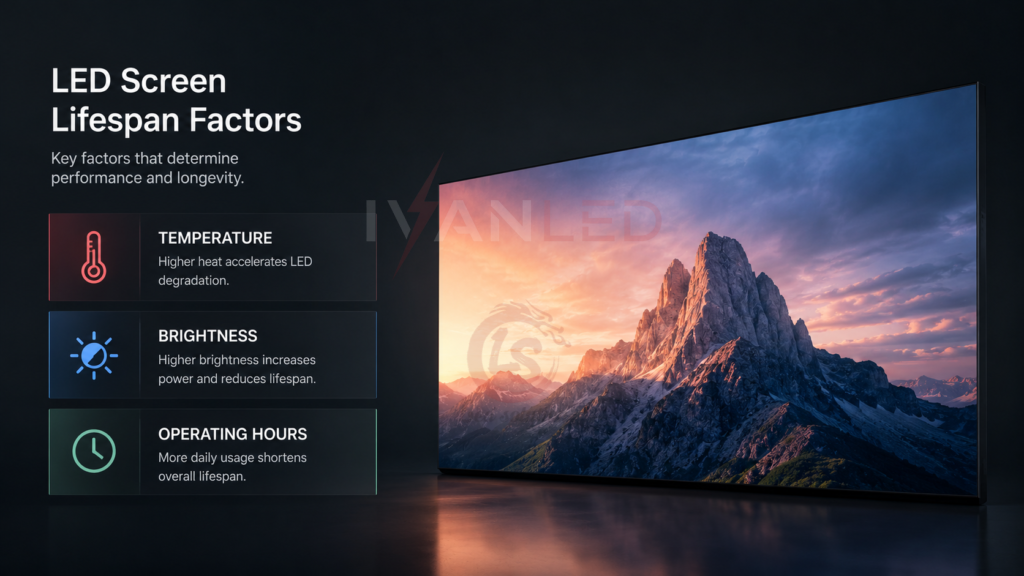
Seven factors determine LED screen lifespan: temperature, operating hours, brightness settings, power quality, maintenance quality, material quality, and physical vibrations.
Temperature: Heat is the #1 enemy of LED lifespan. Every 10°C increase in operating temperature can roughly double the rate of LED degradation. Proper ventilation and cooling are essential.
Operating hours: Continuous 24/7 operation accelerates aging. Commercial signage running 24/7 will have a shorter actual lifespan than a conference room screen used 8 hours per day.
Brightness settings: Running at 100% brightness generates maximum heat and accelerates LED degradation. Operating at 70-80% brightness can extend lifespan by 2-3x.
Power quality: Unstable power supply and surges damage LED drivers and chips. Quality power supplies and surge protectors are essential.
Maintenance quality: Regular cleaning, software updates, and timely repairs prevent component deterioration. Neglect accelerates failure.
Material quality: High-quality LEDs, driver ICs, and thermal management systems last significantly longer than budget components.
Vibrations: Excessive vibration during transport or installation can damage solder joints and connections.
Indoor vs Outdoor Lifespan Differences
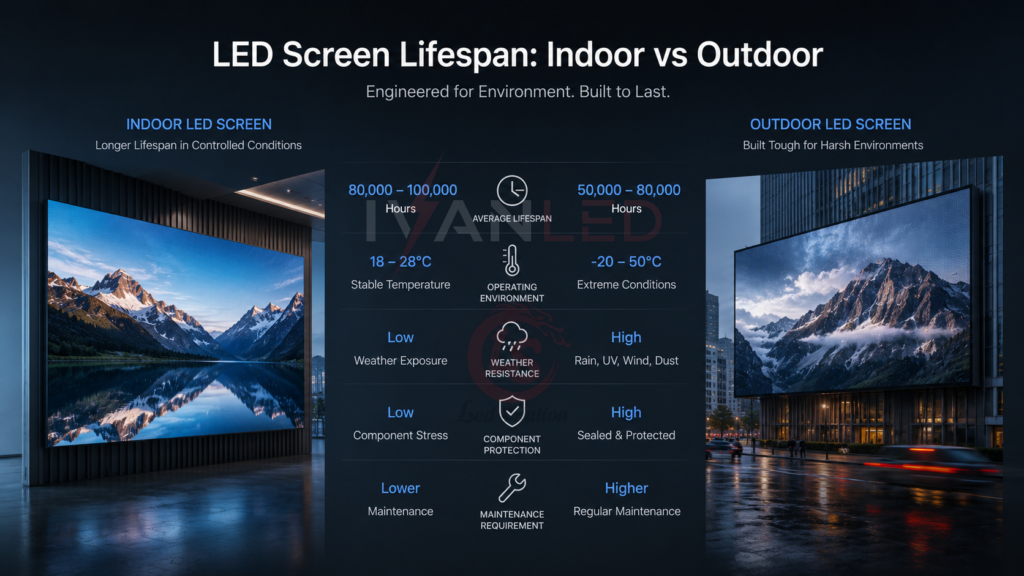
Outdoor LED screens typically have shorter lifespans than indoor screens due to weather exposure, temperature extremes, and higher brightness requirements. Indoor screens operate in controlled environments and at lower brightness, extending their lifespan.
| Factor | Indoor LED | Outdoor LED |
| Typical lifespan | 80,000-100,000 hours | 50,000-80,000 hours |
| Brightness | 800-1,500 nits | 4,500-6,500+ nits |
| Temperature exposure | Controlled | Extreme (sun, cold) |
| Weather exposure | None | Rain, humidity, UV |
| Maintenance frequency | Monthly to quarterly | Weekly to bi-weekly |
For more on indoor vs outdoor, see our indoor vs outdoor LED display guide.
How Brightness Affects Lifespan
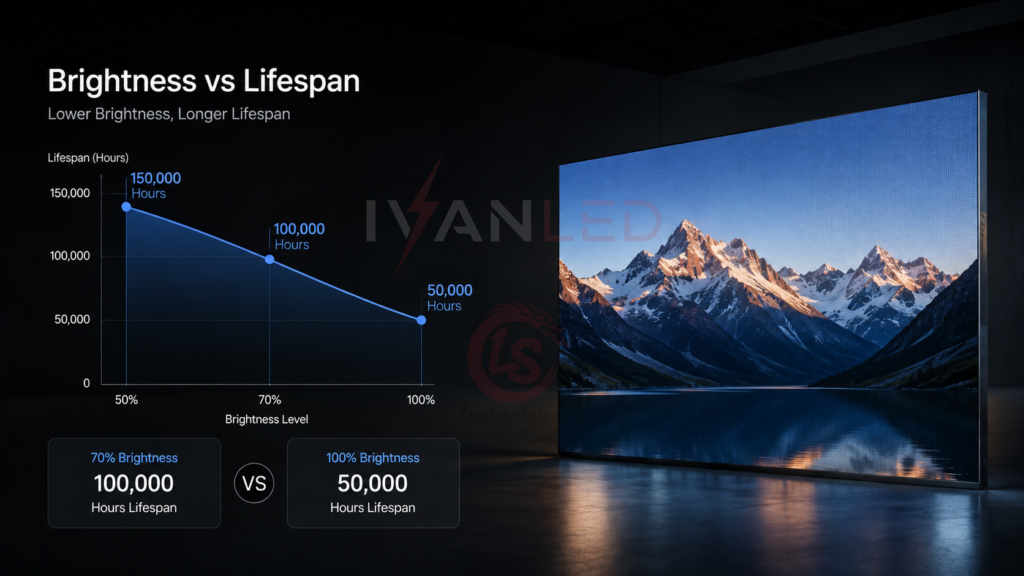
Operating an LED screen at 70-80% brightness instead of 100% can extend lifespan by 2-3x. Higher brightness generates more heat, which accelerates LED degradation.
The relationship between brightness and lifespan:
- 100% brightness: Maximum heat, fastest degradation, shortest lifespan
- 80% brightness: 30-50% less heat, significantly longer lifespan
- 70% brightness: Minimal visible difference to viewers, 2-3x longer lifespan
Implementation: Set maximum brightness in your controller to 80% instead of 100%. For outdoor displays, use automatic brightness control to lower output at night.
For more on brightness, see our candela vs lumens vs lux guide.
How to Extend LED Screen Lifespan
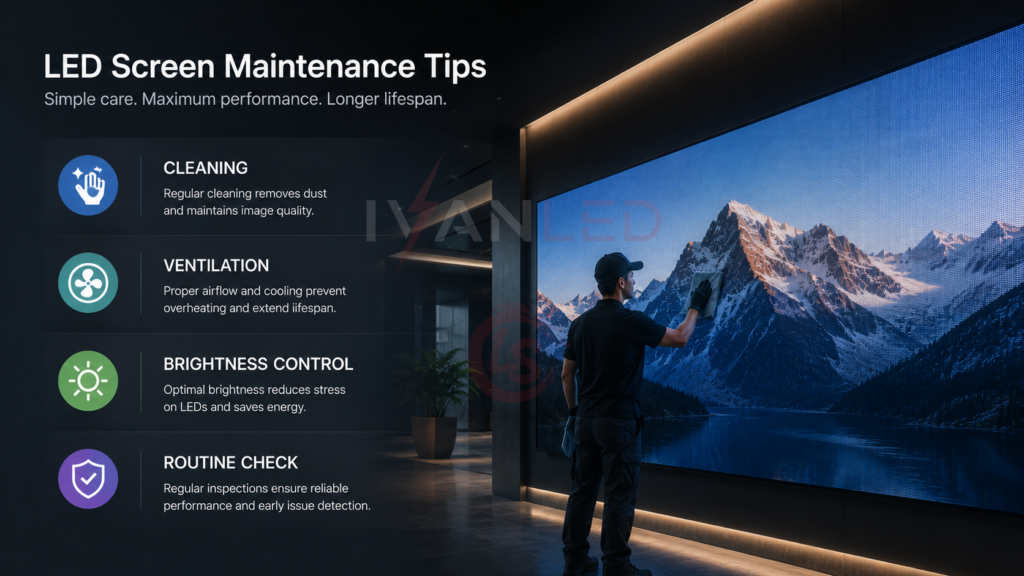
Six practices extend LED screen lifespan: reduce operating brightness, ensure proper ventilation, perform regular cleaning, turn off when idle, use surge protection, and schedule periodic maintenance.
1. Reduce operating brightness: Run at 70-80% instead of 100%. Viewers rarely notice the difference, but lifespan doubles.
2. Ensure proper ventilation: Install cooling fans or ensure adequate airflow. Heat buildup accelerates component degradation.
3. Regular cleaning: Dust traps heat and blocks light output. Clean indoor screens every 3-6 months, outdoor screens every 1-3 months.
4. Turn off when idle: Power down during non-operating hours to reduce unnecessary wear.
5. Use surge protection: Protect against power fluctuations that can damage drivers and power supplies.
6. Schedule maintenance: Regular inspection, calibration, and timely repairs prevent small issues from becoming major failures.
For more on maintenance, see our LED screen cleaning guide.
What Is L70/L80 Lifespan Rating?
L70 rating is the number of hours until brightness drops to 70% of original output. L80 is hours until 80% brightness remains. A display with L70 50,000 hours will dim to 70% brightness after 50,000 hours — it does not stop working.
Key lifespan metrics:
- L70 50,000 hours: Brightness drops to 70% after 50,000 hours
- L70 100,000 hours: Brightness drops to 70% after 100,000 hours
- L80 rating: Hours until 80% brightness remains
Always ask suppliers for L70/L80 data in writing. If they cannot provide it, assume the lifespan is significantly lower than claimed.
For more on lifespan metrics, see our LED display light attenuation guide.
Common Mistakes That Shorten Lifespan
The most common mistake is running LED screens at 100% brightness 24/7. This dramatically shortens lifespan with minimal visual benefit. Reducing to 70-80% brightness doubles effective lifespan.
Other frequent errors:
- Ignoring heat management: Blocked vents or poor airflow accelerate component degradation
- No surge protection: Power fluctuations damage drivers and power supplies
- Delaying maintenance: Dust buildup and minor issues compound over time
- No spare modules: Without spares purchased with the initial order, future repairs will have color mismatch
- High brightness for non-critical content: Running at 100% brightness for simple text or signage is wasteful and accelerates aging
Expert Tips for Maximizing Lifespan
Tip 1: Derate brightness by 20-30% from day one.
Most viewers will not notice the difference, but your LEDs will last 2-3x longer. Use automatic brightness control to manage this automatically.
Tip 2: Order spare modules with your initial purchase — at least 10%.
LED batches change every 1-2 years. Spare modules purchased later will have color and brightness mismatch. This 10% add-on is the best insurance you can buy.
Tip 3: Monitor temperature, not just hours.
Two displays with the same operating hours can have very different lifespans if one runs hotter. Install temperature sensors if your budget allows.
Tip 4: For outdoor screens, demand IP65 and UV-resistant encapsulation.
Moisture and UV are two of the fastest killers of outdoor LED displays. IP65 is non-negotiable.
Tip 5: Schedule regular professional maintenance.
Annual calibration, cleaning, and inspection catch issues before they become major failures.
Frequently Asked Questions (FAQ)
How long does an LED screen last?
Quality LED screens last 50,000–100,000 hours — approximately 5-10 years of normal commercial use. With proper care (70-80% brightness, adequate cooling), they can last 10+ years.
Which lasts longer: LED or LCD?
LED screens last significantly longer than LCD. LED lifespan: 50,000–100,000 hours. LCD lifespan: 30,000–60,000 hours. LED also has slower brightness decay and no burn-in risk.
Does higher brightness shorten LED screen lifespan?
Yes. Higher brightness generates more heat, which accelerates LED degradation. Operating at 70-80% brightness instead of 100% can extend lifespan by 2-3x with minimal visible difference to viewers.
What is L70 lifespan rating?
L70 is the number of hours until brightness drops to 70% of original output. L70 50,000 hours means the display dims to 70% brightness after 50,000 hours. It does not mean the display stops working — it is still functional but dimmer.
Does IvanLED provide L70/L80 lifespan data?
Yes. IvanLED provides clear L70/L80 ratings and lifespan data for all displays. Browse our LED display products or contact us for specific data on your project.
Conclusion: Lifespan Is Within Your Control
LED screens offer exceptional lifespan compared to other display technologies — 50,000–100,000 hours versus 30,000–60,000 for LCD. However, actual lifespan depends on operating conditions, brightness settings, and maintenance practices.
Our straightforward advice:
– Reduce brightness to 70-80% — viewers rarely notice, lifespan doubles.
– Ensure proper ventilation — heat is the #1 lifespan killer.
– Order spare modules (10%) with your initial purchase.
– Request L70/L80 data — if a supplier cannot provide it, assume lower lifespan.
– Schedule regular maintenance — cleaning, calibration, and inspection.
At IvanLED, we manufacture LED displays with high-quality components and provide clear L70/L80 lifespan data.