Buyer Pain Points: Color Accuracy Confusion
Buyers face specific challenges when evaluating LED screen color quality:
Why do colors look different on different screens? LED chips have natural variations. Quality manufacturers “bin” (sort) LEDs into tight tolerance groups. Cheap screens use mixed bins, resulting in inconsistent colors.
What specification matters most for color? For brand logos, Delta E (color accuracy) is critical. For advertising, color gamut (DCI-P3) and brightness are most important. For gradients and video, bit depth (10-bit+) matters.
Can I fix color problems after installation? Professional calibration can correct some issues, but poorly binned LEDs have limits. Start with quality LEDs from a reputable manufacturer.
Why do some screens look patchy? Inconsistent binning or poor calibration. Quality manufacturers provide batch-matched modules and calibration reports.
How do I evaluate color quality before buying? Ask for the LED brand and binning, calibration report, Delta E value, and view the screen with your own content from different angles.
How LED Screens Produce Colors
LED screens use three primary colors — Red, Green, and Blue (RGB). By varying the intensity of each, the screen can produce millions of colors. The color of each LED depends on the semiconductor material used.
Color combinations:
- Red + Green: Yellow
- Green + Blue: Cyan
- Blue + Red: Magenta
- Red + Green + Blue (full intensity): White
- No color (all off): Black
White LEDs are made by placing a yellow phosphor coating over a blue LED — this is how most LED displays produce white light.
For more on LED display technology, see our LED display functions guide.
Key Color Specifications Buyers Need to Know
Four key color specifications determine LED screen quality: color gamut (range of colors), color accuracy (Delta E), contrast ratio, and bit depth (color depth).
| Specification | What It Measures | Why It Matters | Target Value |
| Color gamut | Range of colors the screen can display | Wider gamut = more vibrant, eye-catching content | DCI-P3 for advertising; sRGB for general use |
| Color accuracy (Delta E) | How close displayed colors are to intended colors | Ensures brand logos and skin tones look correct | ΔE < 3 for most; ΔE < 2 for professional |
| Contrast ratio | Difference between brightest white and darkest black | Higher contrast = more readable text, more impact | 5,000:1+ for video walls |
| Bit depth | Number of bits per color channel | Higher bit depth = smoother gradients, no banding | 10-bit+ for professional; 8-bit for general |
For more on display specifications, see our LED screen quality guide.
LED Display Types Compared
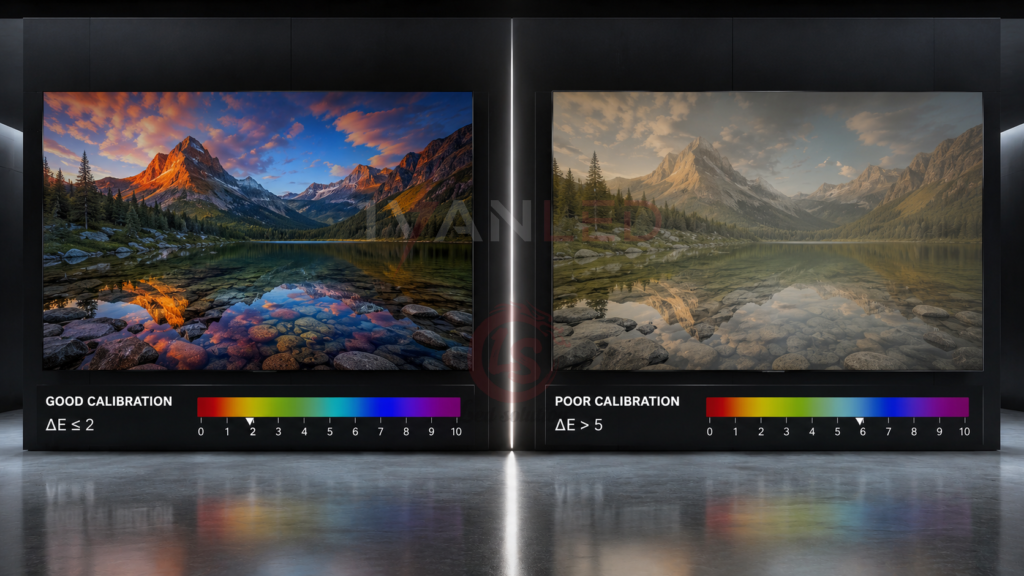
Different LED display technologies offer different color performance. Direct-view LED (SMD and COB), Mini-LED, Micro-LED, and OLED each have strengths for specific applications.
| Technology | Color Performance | Brightness (nits) | Black Level | Best For |
| Direct-View LED (SMD) | Excellent | Very high (5,000+) | Good | Outdoor, large indoor |
| Direct-View LED (COB) | Excellent + protection | High (1,500-3,000) | Very good | High-end indoor, rental |
| Mini-LED | Very good | High | Very good | Premium displays, fine pitch |
| Micro-LED | Excellent | Very high | Excellent | Luxury, command centers |
| OLED | Excellent (per-pixel light) | Medium (500-1,000) | True black | Broadcast, museums |
For more on LED packaging technologies, see our COB vs CSP comparison guide.
Common Color Problems and Their Business Impact
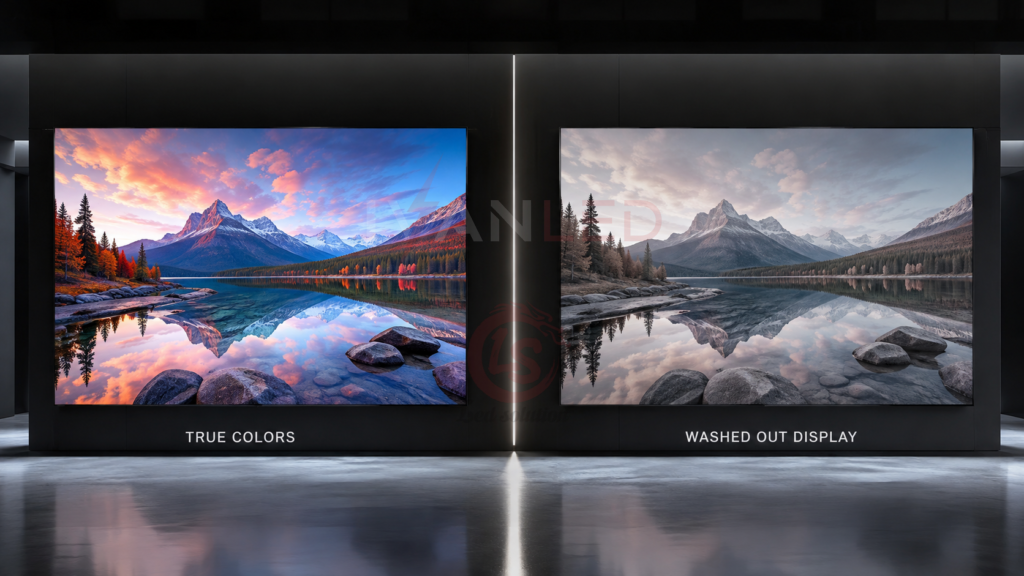
Four common color problems affect LED screens: color shifting (colors change off-angle), color banding (visible steps in gradients), inconsistent color across modules (patchy appearance), and color washout in bright light (fading in sunlight).
Problem 1: Color shifting. Colors change when viewed from different angles. Impact: People walking past see different colors than those standing in front — brand inconsistency. Prevention: Choose SMD or COB with 160°+ viewing angle.
Problem 2: Color banding. Smooth gradients appear as visible steps. Impact: Looks unprofessional; sky scenes, skin tones, and product images appear blocky. Prevention: Choose 10-bit or higher color depth.
Problem 3: Inconsistent color across modules. Different modules show different shades. Impact: Patchwork quilt appearance — unacceptable for video walls. Prevention: Buy from manufacturers with well-binned LEDs and calibration data.
Problem 4: Color washout in bright light. Colors fade in direct sunlight. Impact: Outdoor ads become unreadable — wasted ad spend. Prevention: Choose 5,000+ nits brightness and proper IP rating.
Color Performance by Application
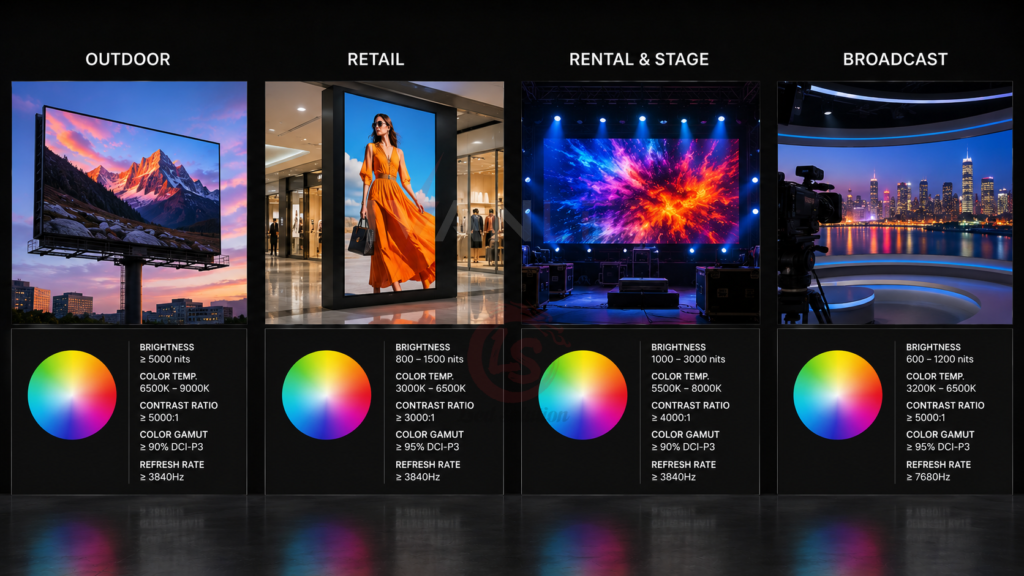
Different applications require different color specifications. Outdoor advertising needs high brightness (5,000+ nits) and wide gamut. Indoor retail needs color accuracy (ΔE < 3) and wide viewing angles. Rental needs consistent color across modules.
| Application | Key Requirement | Specification | ROI Impact |
| Outdoor billboards | Sunlight visibility | 5,000-6,000+ nits, DCI-P3+ | Higher ad revenue, premium pricing |
| Indoor retail | Brand colors correct | ΔE < 3, 160°+ viewing angle | Better brand perception, higher sales |
| Rental and events | Consistent color | Stable across modules, COB protection | Repeat customers, premium rates |
| Broadcast/control rooms | Professional accuracy | ΔE < 2, 14-bit+, 3,840Hz | Professional reputation, broadcast standards |
How to Evaluate Color Quality Before Buying
Evaluate color quality by asking for the LED brand and binning, requesting a calibration report, viewing the screen from different angles, testing with your own content, comparing modules side by side, and asking about uniformity warranty.
Checklist for buyers:
- LED brand and binning: Nationstar, Kinglight, San’an are quality brands. “Mixed bins” = red flag.
- Calibration report: Request individual module calibration data. No report = no quality control.
- View from different angles: Walk to the side — if colors shift noticeably, reject.
- Test with your own content: Skin tones and brand logos reveal color accuracy issues.
- Compare two modules: Visible color difference = poor binning.
- Uniformity warranty: Protects against patchy appearance over time.
IvanLED Color Quality
At IvanLED, we prioritize color accuracy in all our displays with premium LED brands, individual module calibration, and rigorous quality control.
Our color quality commitment:
- Premium LED brands: Nationstar, Kinglight (well-binned)
- Calibration: Every module individually calibrated
- Color depth: 10-bit support on fine-pitch models
- Viewing angle: 140°-160° standard; COB: 170°+
- Quality control: 72-hour aging test before shipping
- Warranty: 3-year on uniformity and defects
Expert Tips for Buyers
Tip 1: Prioritize Delta E for brand-sensitive applications.
If you display brand logos or product images, ΔE < 3 is essential. ΔE < 2 is professional-grade.
Tip 2: Choose DCI-P3 for advertising.
Wider color gamut produces more vibrant, eye-catching content. Advertisers notice the difference.
Tip 3: Request batch-matched modules.
Modules from the same production batch ensure consistent color across the entire screen.
Tip 4: Test with your own content.
Bring your brand logo, product images, and video content to the demo. Skin tones and gradients reveal color quality.
Tip 5: Order spare modules.
Order 5-10% spare modules with your initial purchase to ensure color match for future repairs.
Frequently Asked Questions (FAQ)
What is the most important color specification for outdoor advertising?
Brightness is most important (5,000-6,000+ nits) for sunlight visibility. After that, color gamut (DCI-P3 or wider) and consistency across modules matter most. Advertisers notice when colors are off.
How do I know if a screen has good color accuracy?
Ask for the Delta E (ΔE) value. Under 3 is good for most applications. Under 2 is excellent for professional use. Also ask about LED binning and the calibration process.
Why do some LED screens look patchy?
Poor binning. LED chips have natural variations in color and brightness. Quality manufacturers sort LEDs into tight tolerance groups. Cheap screens use mixed bins, resulting in patchy appearance.
What is the difference between color gamut and color accuracy?
Color gamut is the range of colors a screen can display. Color accuracy is how correctly it displays those colors. A screen can have wide gamut but poor accuracy — colors will be vivid but wrong. You need both.
Does IvanLED calibrate its screens before shipping?
Yes. Every IvanLED display undergoes individual calibration before shipping. We provide calibration reports upon request. Browse our commercial LED display or contact us to learn more.
Conclusion: Color Accuracy = Business Impact
Color accuracy is not a technical luxury — it is a business necessity. Accurate colors mean brand consistency, professional appearance, and premium pricing. Inaccurate colors mean logos look wrong, content looks cheap, and advertisers do not return.
Our straightforward advice:
– For brand-sensitive applications: Choose displays with ΔE < 3 and DCI-P3 color gamut.
– For outdoor advertising: Prioritize 5,000+ nits brightness and well-binned LEDs.
– For rental and events: Choose COB displays with consistent color across modules.
– Always request calibration reports and batch-matching certificates.
At IvanLED, we prioritize color accuracy in all our displays with premium LED brands, individual module calibration, and rigorous quality control.
Ready to specify accurate color for your LED display?
👉 Contact IvanLED for a free consultation and customized quote.