Buyer Pain Points: Resolution Confusion
Buyers face specific challenges when choosing LED screen resolution:
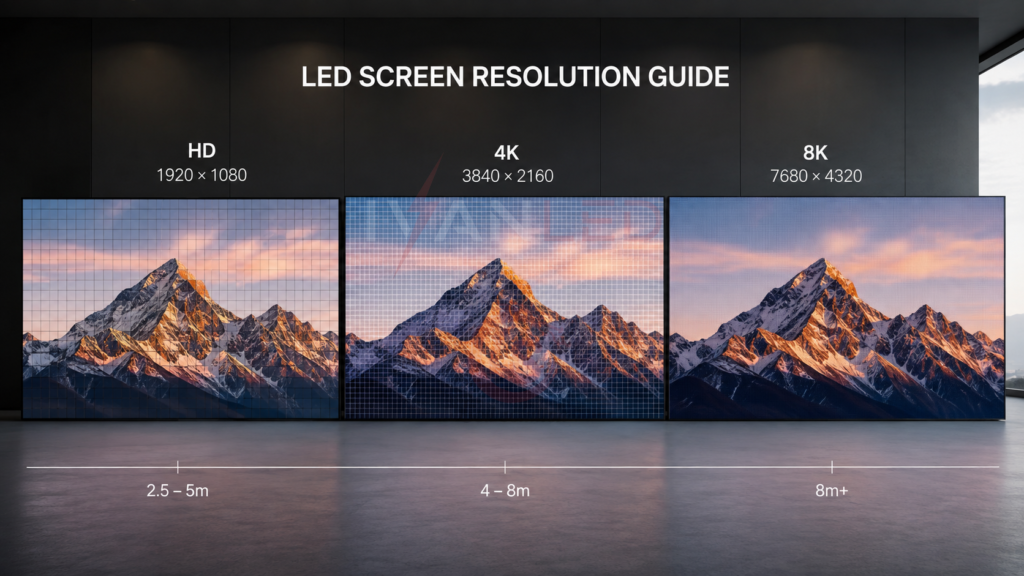
What resolution do I actually need? Most commercial applications work perfectly with 1080p or 4K. 8K is rarely necessary — only for ultra-large screens or professional content production where cropping is required.
How does pixel pitch relate to resolution? Pixel pitch determines resolution for a given screen size. Smaller pixel pitch = higher resolution = sharper images at closer viewing distances. The formula: Resolution = screen size ÷ pixel pitch.
Is 4K always better than 1080p? For close viewing (under 2 meters), yes. For distances over 3 meters, the human eye cannot distinguish 4K from 1080p on screens under 100 inches.
How do I calculate resolution for a custom screen? Use the formula: (screen width in mm ÷ pixel pitch in mm) × (screen height in mm ÷ pixel pitch in mm).
What about future-proofing? Choosing 4K may seem future-proof, but the premium cost often outweighs the benefit if your viewing distance is over 3 meters.
What Is LED Screen Resolution?
LED screen resolution is the total number of pixels on the screen — calculated as width in pixels × height in pixels. Resolution determines image clarity, sharpness, and the minimum viewing distance before individual pixels become visible.
Key concepts:
- Resolution: Total pixels (width × height)
- Pixel pitch: Distance between adjacent pixels (mm)
- Pixel density: Pixels per square meter
For more on display specifications, see our LED screen quality guide.
Resolution Standards Compared
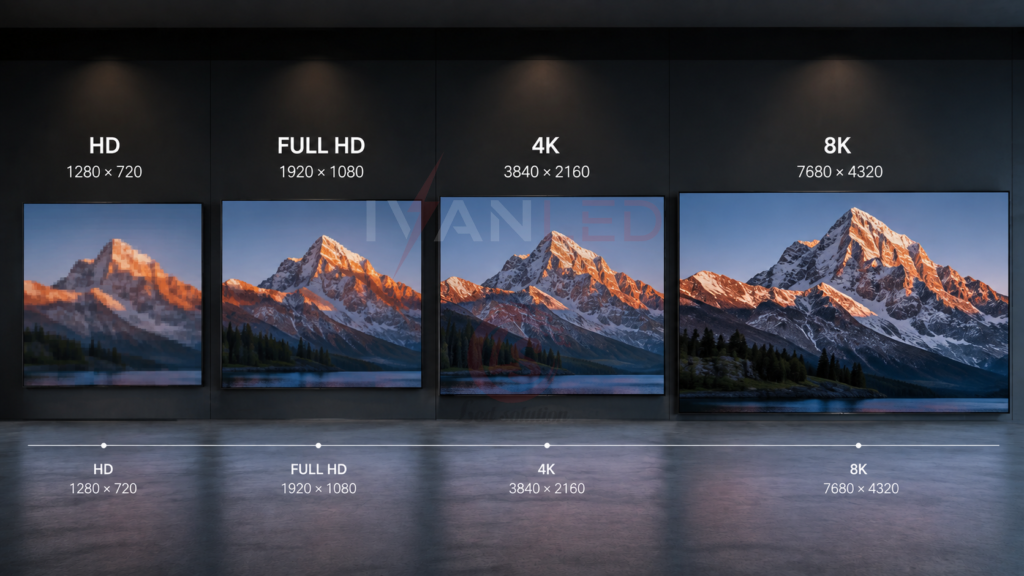
The most common resolution standards are HD (720p), Full HD (1080p), 4K UHD, and 8K UHD. Each has different pixel counts and optimal viewing distances.
| Resolution | Pixel Count | Total Pixels | Optimal Viewing Distance | Best For |
| HD (720p) | 1280 × 720 | 0.9 megapixels | 3-5 meters | Small screens, cost-effective signage |
| Full HD (1080p) | 1920 × 1080 | 2.1 megapixels | 2-4 meters | Most commercial applications |
| 4K UHD | 3840 × 2160 | 8.3 megapixels | 1.5-2.5 meters | Large screens, premium applications |
| 8K UHD | 7680 × 4320 | 33.2 megapixels | Under 1.5 meters | Ultra-large screens, professional production |
For more on resolution comparisons, see our HD vs UHD guide.
How to Calculate LED Screen Resolution
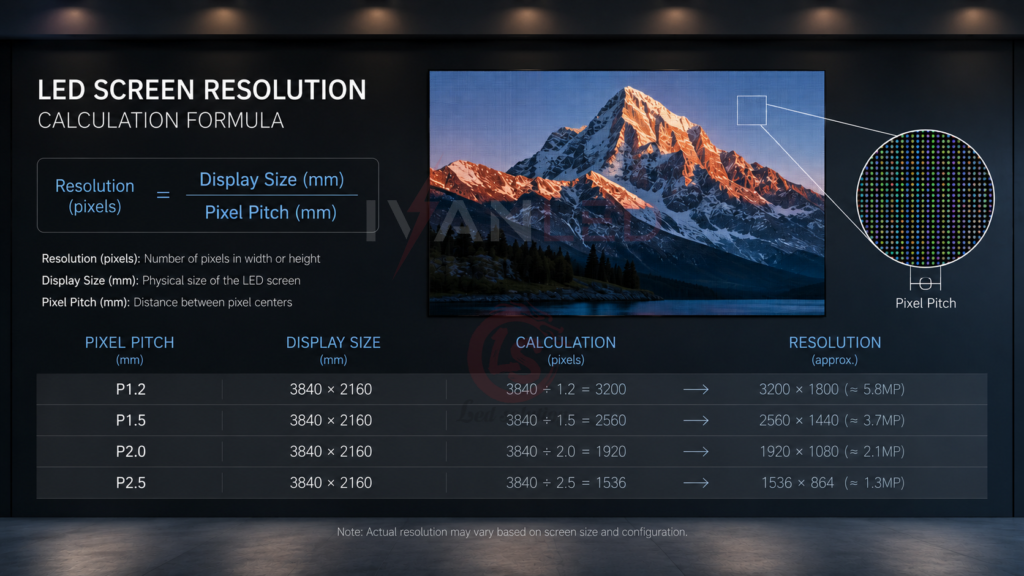
Resolution = (screen width ÷ pixel pitch) × (screen height ÷ pixel pitch). For a 3m × 2m screen with P5 pixel pitch: (3000mm ÷ 5mm) × (2000mm ÷ 5mm) = 600 × 400 = 240,000 pixels.
Step-by-step calculation:
- Convert screen size to millimeters: 1m = 1000mm
- Divide width by pixel pitch: Width in mm ÷ pixel pitch in mm = pixels wide
- Divide height by pixel pitch: Height in mm ÷ pixel pitch in mm = pixels high
- Multiply: Pixels wide × pixels high = total resolution
Example calculations:
- 2m × 1.5m screen with P2.5: (2000 ÷ 2.5) × (1500 ÷ 2.5) = 800 × 600 = 480,000 pixels
- 4m × 3m screen with P4: (4000 ÷ 4) × (3000 ÷ 4) = 1000 × 750 = 750,000 pixels
- 6m × 3.375m screen with P1.5: (6000 ÷ 1.5) × (3375 ÷ 1.5) = 4000 × 2250 = 9,000,000 pixels (4K equivalent)
For more on pixel pitch selection, see our pixel pitch selection guide.
Factors Influencing Resolution Choice
Four factors influence resolution choice: pixel pitch, screen size, application type, and budget. Smaller pixel pitch and larger screen sizes require higher resolution for sharp images.
Pixel pitch: Smaller pixel pitch = higher pixel density = sharper images at closer distances. P1.5–P2.5 for indoor close viewing; P4–P6 for medium distances; P8–P10 for outdoor billboards.
Screen size: Larger screens require more pixels to maintain sharpness. A 4m screen with 1080p looks sharp; a 10m screen with 1080p looks pixelated.
Application type: Control rooms and broadcast studios need high resolution for fine text and data. Digital signage and outdoor billboards can use lower resolution due to viewing distance.
Budget: Higher resolution screens with smaller pixel pitch cost significantly more. Balance resolution requirements with budget constraints.
For more on application-specific selection, see our commercial LED display solutions.
Resolution by Application
Different applications require different resolutions. Control rooms need 4K for fine text. Outdoor billboards work with HD or 1080p due to long viewing distances.
| Application | Recommended Resolution | Typical Pixel Pitch | Viewing Distance |
| Control room / command center | 4K | P0.9 – P1.5 | 1-2 meters |
| Broadcast studio / virtual production | 4K – 8K | P0.9 – P1.5 | 1-3 meters |
| Corporate lobby / conference room | 1080p – 4K | P1.5 – P2.5 | 2-4 meters |
| Retail / digital signage | 1080p | P2.5 – P4 | 3-5 meters |
| Church / auditorium | 1080p – 4K | P2.5 – P3.9 | 4-10 meters |
| Outdoor billboard | HD – 1080p | P6 – P10 | 8-50 meters |
| Event / rental | 1080p | P2.5 – P3.9 | 3-8 meters |
Common Mistakes When Choosing Resolution
The most common mistake is choosing 4K for applications where the viewing distance makes the extra resolution invisible. At 3 meters, most viewers cannot distinguish 4K from 1080p on screens under 100 inches.
Other frequent errors:
- Overlooking pixel pitch: A P10 screen cannot deliver 4K resolution regardless of the content. Pixel pitch determines the maximum resolution.
- Mismatched content: Displaying 720p content on a 4K screen upscales poorly — the image looks soft and pixelated.
- Ignoring environmental factors: Outdoor screens need high brightness (5,000+ nits) — resolution alone does not ensure visibility.
- Future-proofing without purpose: Buying 8K “for the future” is often wasted budget if your viewing distance and content do not require it.
- Not calculating total cost: Higher resolution requires more powerful controllers, higher bandwidth, and more storage — not just a more expensive screen.
Expert Tips for Buyers
Tip 1: Calculate your viewing distance first.
Measure the distance from the screen to the closest viewer. Use this guide: under 2m = 4K; 2-4m = 1080p; over 4m = HD or 1080p.
Tip 2: Match resolution to content.
If your content is 1080p, a 4K screen will not improve it — it will just upscale. Invest in content quality first.
Tip 3: Use the resolution formula.
For custom screens, calculate the resolution using the formula: (width ÷ pitch) × (height ÷ pitch). Confirm the result meets your requirements.
Tip 4: Consider total system cost.
4K requires more powerful controllers, higher bandwidth, and more storage. The screen is only 40-60% of the total investment.
Tip 5: Order spare modules.
Order 5-10% spare modules with your initial purchase to ensure color match for future repairs.
For more on total cost, see our LED display price guide 2026.
Frequently Asked Questions (FAQ)
What is the relationship between pixel pitch and resolution?
Pixel pitch determines resolution for a given screen size. The formula is: Resolution = (screen width ÷ pixel pitch) × (screen height ÷ pixel pitch). Smaller pixel pitch = higher resolution = sharper images at closer viewing distances.
Is 4K better than 1080p for LED displays?
4K offers four times the pixel count of 1080p, but the human eye can only see the difference at close viewing distances (under 2 meters) or on very large screens (over 100 inches). For most commercial applications with viewing distances over 3 meters, 1080p provides excellent image quality at a much lower cost.
Can I upgrade the resolution of an existing LED screen?
No. Resolution is determined by pixel pitch and screen size. To change resolution, you need to replace the LED modules and potentially the control system. It is generally more cost-effective to buy the correct resolution upfront.
What pixel pitch is needed for 4K resolution?
For a typical 8m × 4.5m screen, 4K resolution (3840 × 2160) requires approximately P2.0 pixel pitch. For smaller screens, the pixel pitch must be even smaller to achieve 4K. Use the formula: pixel pitch = screen width ÷ 3840.
Does IvanLED offer displays in HD, 1080p, and 4K resolutions?
Yes. IvanLED manufactures LED displays in HD, 1080p, 4K, and custom resolutions.
Conclusion: Choosing the Right Resolution
LED screen resolution is a critical specification that directly impacts image quality, viewing distance, and total cost. The right choice depends on viewing distance, screen size, content type, and budget. Use the resolution formula to calculate the optimal pixel pitch for your application.
Our straightforward advice:
– For viewing distances over 3 meters: 1080p is sufficient and cost-effective.
– For viewing distances under 2 meters: 4K delivers visible benefits.
– For outdoor billboards: HD or 1080p is sufficient — prioritize brightness over resolution.
– Always calculate resolution using the formula before specifying pixel pitch.
– Order spare modules (5-10%) with your initial purchase.
At IvanLED, we manufacture LED displays in HD, 1080p, 4K, and custom resolutions. Browse our LED display products or contact us to discuss your project requirements.
Ready to specify the right resolution for your project?
👉 Contact IvanLED for a free consultation and customized quote.