Buyer Pain Points: Pixel Pitch Confusion
Buyers face specific challenges when choosing pixel pitch:
What pixel pitch do I actually need? It depends on your viewing distance. For a church with front row at 5 meters, P2.5–P3.9 is ideal. For an outdoor billboard viewed from 30 meters, P8–P10 is sufficient.
Why do smaller pixel pitches cost so much more? Smaller pitch means more LEDs per square meter — up to 694,444 for P1.2 vs. 10,000 for P10. More LEDs, more driver ICs, and more processing power drive the cost.
Is smaller pixel pitch always better? For close viewing, yes. But for long-distance viewing, you cannot see the difference. A P10 billboard viewed from 30 meters looks the same as a P5 billboard from the same distance.
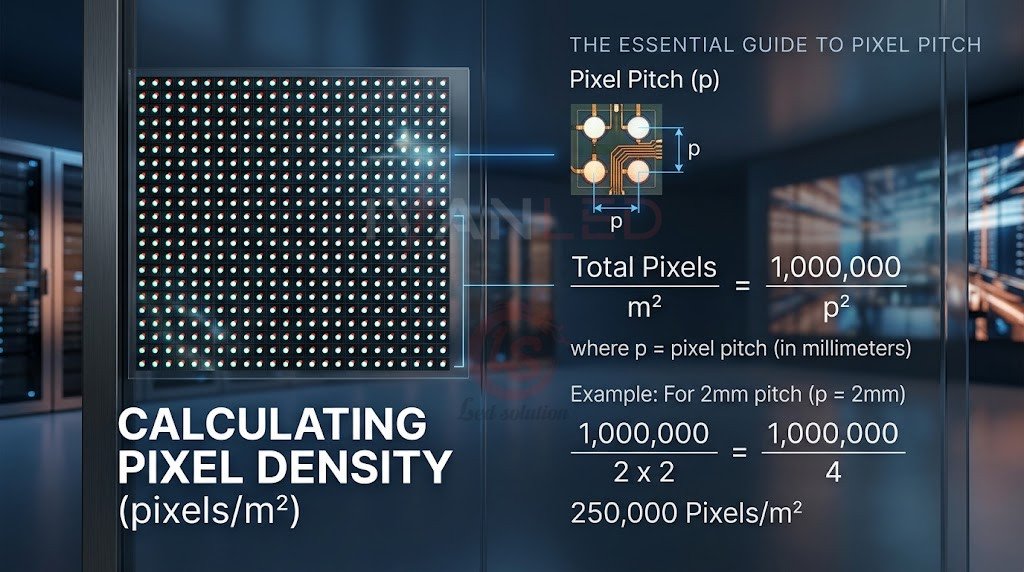
How do I calculate pixel density? Pixel density (pixels/m²) = (1000 ÷ pixel pitch in mm)². P2.5 = 160,000 pixels/m²; P10 = 10,000 pixels/m².
Can I mix different pixel pitches on one screen? No. All modules must have the same pixel pitch. Mixing pitches creates visible lines and inconsistent image quality.
What Is Pixel Pitch?
Pixel pitch is the distance between the center of one LED pixel and the center of the next pixel, measured in millimeters (mm). P2.5 means 2.5mm between pixels; P4 means 4mm; P10 means 10mm. Smaller pitch = more pixels per square meter = sharper image = higher cost.
Visual concept: Think of pixel pitch like the dots in a newspaper photo. Smaller dots (closer together) create a smoother image. Larger dots (farther apart) look grainy up close but are fine from a distance.
For more on display specifications, see our LED screen quality guide.
Pixel Pitch vs. Viewing Distance
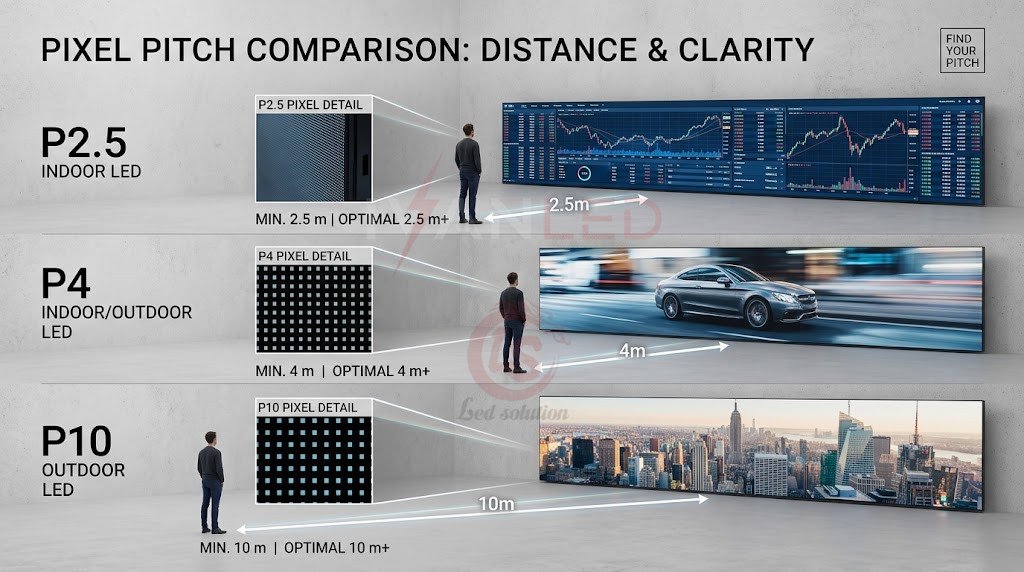
The most important relationship to understand: Minimum viewing distance (meters) ≈ Pixel pitch (mm). For P2.5, viewers should be at least 2.5 meters away. For P10, 10 meters away. If viewers are closer, they will see individual pixels.
| Pixel Pitch | Minimum Viewing Distance | Maximum Comfortable Distance |
| P1.2 | 1.2 meters | 5 meters |
| P1.5 | 1.5 meters | 6 meters |
| P1.9 | 1.9 meters | 8 meters |
| P2.5 | 2.5 meters | 10 meters |
| P3.9 | 3.9 meters | 15 meters |
| P4.8 | 4.8 meters | 20 meters |
| P6.6 | 6.6 meters | 30 meters |
| P8 | 8 meters | 40 meters |
| P10 | 10 meters | 50 meters |
| P16 | 16 meters | 80 meters |
What happens if you break the rule:
- Viewing too close to large pitch: See individual pixels — “blocky” or “pixelated” image
- Viewing too far from small pitch: Wasted resolution — you paid for detail you cannot see
For more on viewing distance, see our indoor vs outdoor pixel pitch guide.
How to Calculate Pixel Pitch and Density
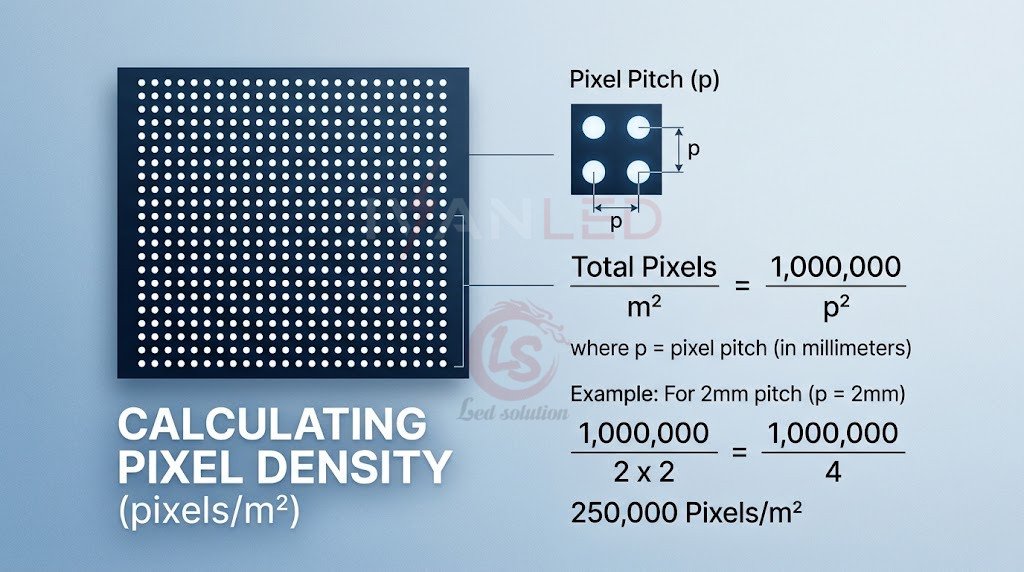
Pixel density (pixels/m²) = (1000 ÷ pixel pitch in mm)². For P2.5: (1000 ÷ 2.5)² = 160,000 pixels/m². For P10: (1000 ÷ 10)² = 10,000 pixels/m².
Common pixel pitch densities:
- P1.2: 694,444 pixels/m²
- P1.5: 444,444 pixels/m²
- P1.9: 277,008 pixels/m²
- P2.5: 160,000 pixels/m²
- P3.9: 65,734 pixels/m²
- P4.8: 43,403 pixels/m²
- P6.6: 22,957 pixels/m²
- P8: 15,625 pixels/m²
- P10: 10,000 pixels/m²
- P16: 3,906 pixels/m²
To convert pixel density back to pitch: Pixel pitch (mm) = 1000 ÷ √(Pixel density).
Pixel Pitch by Application
Different applications require different pixel pitches. Control rooms need P1.2–P1.9 for close viewing. Outdoor billboards need P8–P16 for long distances. Match pitch to your viewing distance and application.
Indoor Applications
| Application | Recommended Pixel Pitch | Why |
| Control room / command center | P1.2 – P1.9 | Operators sit close (1-2m), need fine detail |
| Broadcast studio | P1.2 – P1.9 | Camera close-ups require high resolution |
| Conference room | P1.5 – P2.5 | Text clarity, presentations |
| Church sanctuary | P2.5 – P3.9 | Balance of cost and viewing distance |
| Retail store | P2.5 – P4 | Good for typical store viewing |
| Museum / exhibition | P1.9 – P3.9 | Close viewing, image quality matters |
| Hotel / corporate lobby | P2.5 – P3.9 | Professional appearance, branding |
Outdoor Applications
| Application | Recommended Pixel Pitch | Why |
| Storefront sign | P4 – P6 | Viewed from sidewalk (3-10m) |
| Gas station price sign | P6 – P10 | Viewed from car (10-20m) |
| Roadside billboard | P8 – P16 | Viewed from passing cars (20-50m) |
| Highway billboard | P10 – P20 | Viewed from far distance (30-100m) |
| Stadium scoreboard | P6 – P10 | Mixed distances, far seats |
| Building facade | P8 – P16 | Long-distance viewing |
| Rental outdoor events | P4 – P8 | Mixed crowd distances |
For more on application-specific selection, see our LED display products.
Pixel Pitch vs. Resolution
For a given screen size, smaller pixel pitch = higher resolution. A 3m × 2m screen with P2.5 has 960,000 pixels; with P10 it has only 60,000 pixels. Resolution determines the level of detail you can show.
Screen size: 3m × 2m (6 m²):
- P2.5: 1200 × 800 = 960,000 pixels
- P3.9: 769 × 513 = 394,000 pixels
- P6.6: 455 × 303 = 138,000 pixels
- P10: 300 × 200 = 60,000 pixels
For more on resolution, see our LED screen resolution guide.
How Pixel Pitch Affects Cost
Pixel pitch is the #1 cost driver for LED displays. P1.2 screens can cost 5-10x more than P10 screens of the same size. More LEDs per square meter means more components, more processing, and higher manufacturing costs.
| Factor | Small Pitch (P1.2-P2.5) | Large Pitch (P6-P16) |
| LED count per m² | Very high (160k-694k) | Low (4k-23k) |
| Component cost | Much higher | Lower |
| Driver ICs needed | More | Fewer |
| Processing power | Higher | Lower |
| Price per m² | $1,000 – $5,000+ | $200 – $800 |
| Typical application | Premium indoor | Outdoor, budget |
For more on pricing, see our LED display price guide 2026.
Pixel Pitch Selection Guide
To select the right pixel pitch: determine your closest viewing distance, calculate the maximum pitch (closest distance in meters), consider your content type, and balance with your budget.
Step 1: Determine your viewing distance:
- Closest viewer: Minimum distance from screen to audience
- Farthest viewer: Maximum distance from screen to audience
Step 2: Calculate maximum pixel pitch: Maximum pitch (mm) = Closest viewing distance (meters). If closest viewer is 3 meters away, maximum pitch is P3 (or smaller).
Step 3: Choose based on content type:
- Simple text / numbers: P4 – P10
- Basic graphics / images: P3 – P6
- Standard video: P2.5 – P5
- High-definition video: P1.5 – P3
- Detailed text (small font): P1.2 – P2.5
- 4K / 8K content: Sub-P1.5
Step 4: Balance with budget:
- Premium budget: Choose smallest pitch your viewing distance allows
- Standard budget: Choose pitch matching closest viewer distance
- Budget-conscious: Choose pitch just above closest viewer distance
Common Pixel Pitch Mistakes
The most common mistake is choosing a pitch too small for the viewing distance. You pay for resolution you cannot see. The second most common mistake is choosing a pitch too large for close viewing — resulting in visible pixels and an unprofessional look.
Other frequent errors:
- Pitch too small for distance: Wasted money — paid for resolution you cannot see
- Pitch too large for close viewing: Visible pixels, unprofessional look
- Using outdoor pitch indoors: Poor image quality up close — outdoor pitches are designed for distance
- Using indoor pitch outdoors: Screen not bright enough for sunlight — indoor screens lack the brightness for outdoor visibility
- Ignoring content type: Text unreadable, video looks bad — match pitch to your primary content
Pixel Pitch Comparison Table
Use this table as a quick reference to match pixel pitch to viewing distance, pixel density, cost, and application.
| Pitch | Best Viewing Distance | Pixel Density (/m²) | Cost Level | Best For |
| P0.9 | 0.9-3m | 1,234,568 | Very high | Luxury, broadcast |
| P1.2 | 1.2-5m | 694,444 | High | Control rooms, fine pitch |
| P1.5 | 1.5-6m | 444,444 | High | Conference, premium indoor |
| P1.9 | 1.9-8m | 277,008 | Medium-high | Church, retail |
| P2.5 | 2.5-10m | 160,000 | Medium | Standard indoor |
| P3.9 | 3.9-15m | 65,734 | Medium | Indoor events, rental |
| P4.8 | 4.8-20m | 43,403 | Low | Semi-outdoor, covered |
| P6.6 | 6.6-30m | 22,957 | Low | Outdoor billboards |
| P8 | 8-40m | 15,625 | Very low | Large outdoor |
| P10 | 10-50m | 10,000 | Very low | Highway signs |
IvanLED Pixel Pitch Options
At IvanLED, we manufacture LED displays in a wide range of pixel pitches to meet every application need:
- P1.2 – P2.5: Fine pitch for indoor, control rooms, corporate
- P2.5 – P4: Standard indoor for retail, churches, events
- P4 – P6: Indoor/outdoor, rental displays
- P6 – P10: Outdoor billboards, stadiums
- Custom pitches: Available for special applications
Browse our commercial LED displays or contact us to discuss your project requirements.
Expert Tips for Buyers
Tip 1: Calculate your viewing distance first.
Measure the distance from the screen to the closest viewer. Use the rule: maximum pixel pitch = closest viewing distance in meters. If closest viewer is 3 meters away, P3 is the maximum you should consider.
Tip 2: Do not over-specify.
A P1.5 screen viewed from 5 meters looks the same as a P3 screen from the same distance. You are paying for resolution you cannot see.
Tip 3: Match pitch to content.
Detailed text and fine graphics need smaller pitches. Simple video and images can use larger pitches.
Tip 4: Consider total cost.
Smaller pitch costs more in hardware, processing, and maintenance. Balance the benefits against the budget.
Tip 5: Order spare modules.
Order 5-10% spare modules with your initial purchase to ensure color match for future repairs.
Frequently Asked Questions (FAQ)
Does smaller pixel pitch always mean better quality?
For close viewing, yes. But for long-distance viewing, you cannot see the difference. A P10 billboard viewed from 30 meters looks the same as a P5 billboard from the same distance. Choose based on your viewing distance, not just the number.
What pixel pitch do I need for a church?
For a typical church sanctuary with front row at 3-5 meters and back row at 15-25 meters, P2.5 to P3.9 is ideal. This balances cost with clear text and image quality.
What is the difference between pixel pitch and resolution?
Pixel pitch is the physical distance between pixels (in mm). Resolution is the number of pixels (width × height). For a given screen size, smaller pitch = higher resolution.
Can I mix different pixel pitches on the same screen?
No. All modules on a single screen must have the same pixel pitch. Mixing pitches would create visible lines and inconsistent image quality.
Does IvanLED offer fine-pitch displays?
Yes. IvanLED manufactures fine-pitch displays from P1.2 to P2.5 for indoor applications. Browse our LED display solutions or contact us for a recommendation based on your viewing distance.
Conclusion: Choosing the Right Pixel Pitch
Pixel pitch is one of the most important decisions when buying an LED display. It directly impacts image quality, viewing distance, and cost. The right choice depends on where your viewers will stand, what content you will display, and your budget.
Our straightforward advice:
– For close viewing (under 3 meters): Choose P1.2 – P2.5.
– For medium viewing (3-8 meters): Choose P2.5 – P4.
– For long viewing (over 8 meters): Choose P4 – P10.
– Always match pixel pitch to viewing distance — do not over-specify.
– Order spare modules (5-10%) with your initial purchase.
At IvanLED, we manufacture LED displays in a wide range of pixel pitches from P1.2 to P10.
Ready to choose the right pixel pitch for your project?
👉 Contact IvanLED for a free consultation and customized quote.