Buyer Pain Points: P2 vs P3 Confusion
Buyers face specific challenges when choosing between P2 and P3 LED screens:
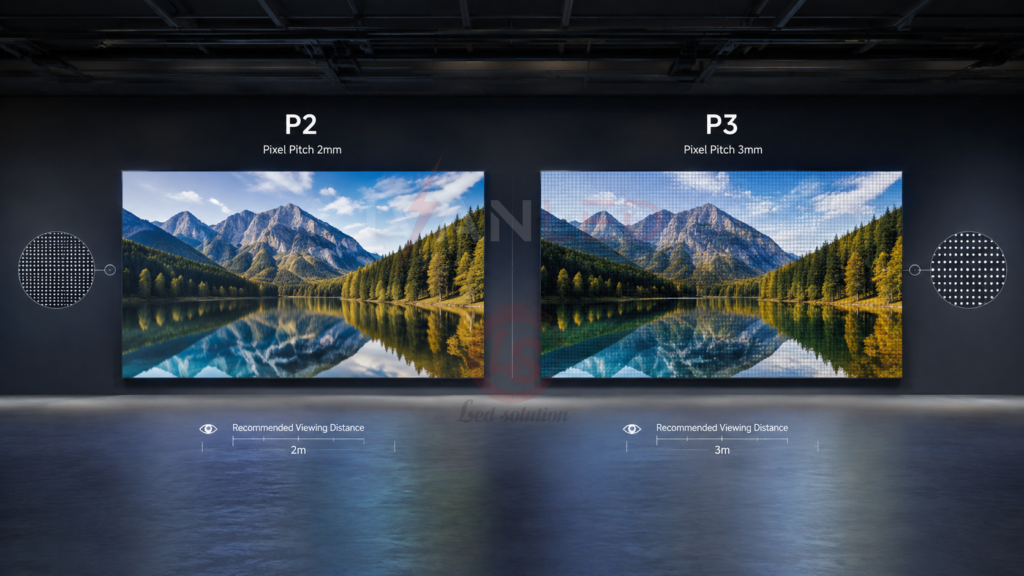
Is P2 really better than P3? For close viewing (under 4 meters), yes — P2 delivers noticeably sharper images. For distances over 4 meters, the human eye cannot distinguish P2 from P3.
How much more does P2 cost? P2 screens typically cost 20-50% more than P3 screens of the same size. The extra resolution is only worth it if your viewers are close.
What viewing distance is right for me? P2: 2-4 meters. P3: 3-6 meters. If your viewers are within 2 meters, consider P1.8 or smaller. If they are over 6 meters, P4 or larger is sufficient.
Will I notice the difference? At 3 meters, most people cannot distinguish P2 from P3. At 2 meters, the difference is visible. At 5 meters, both look the same.
What about future-proofing? Choosing P2 may seem future-proof, but the premium cost often outweighs the benefit if your viewing distance is over 4 meters.
What Is P2 LED Screen?
P2 refers to a 2mm pixel pitch — the distance between adjacent LED pixels. Smaller pixel pitch means higher pixel density, sharper images, and closer viewing distances.
Key characteristics:
- Pixel pitch: 2mm
- Optimal viewing distance: 2-4 meters
- Pixel density: 250,000 pixels per square meter
- Best for: Close viewing, high-resolution applications
- Typical applications: Conference rooms, control rooms, luxury retail, broadcast studios
P2 screens deliver superior image quality but come at a higher cost. For more on pixel pitch selection, see our pixel pitch selection guide.
What Is P3 LED Screen?
P3 refers to a 3mm pixel pitch — the distance between adjacent LED pixels. It offers lower pixel density than P2 but provides a good balance of quality and cost for medium viewing distances.
Key characteristics:
- Pixel pitch: 3mm
- Optimal viewing distance: 3-6 meters
- Pixel density: 111,111 pixels per square meter
- Best for: Medium viewing distances, cost-sensitive applications
- Typical applications: Retail signage, corporate lobbies, churches, event venues
P3 screens are the most common choice for indoor commercial displays, offering excellent image quality at a more accessible price point.
P2 vs P3: Key Differences
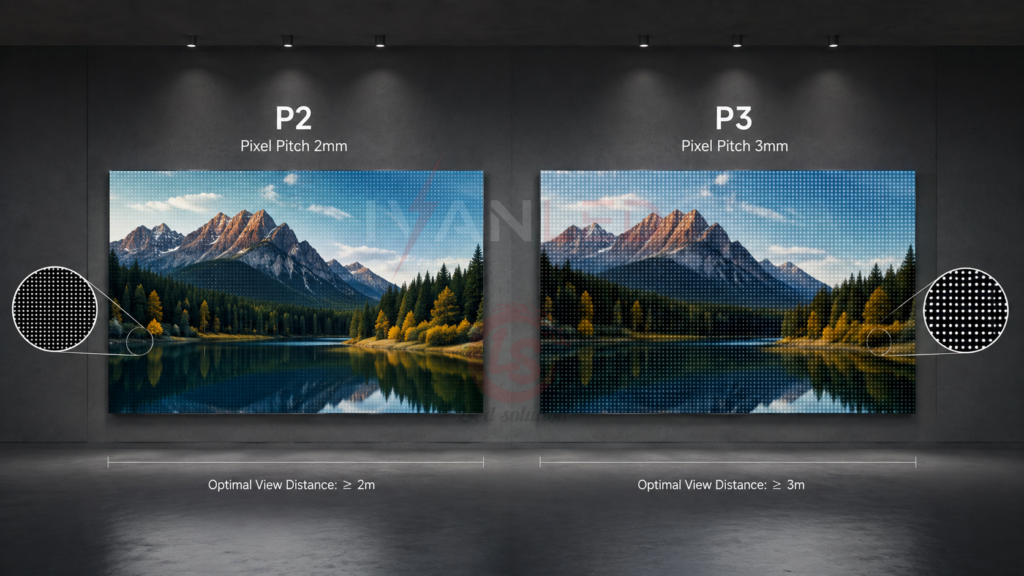
The key differences between P2 and P3 are pixel pitch, pixel density, optimal viewing distance, image sharpness, and cost. P2 delivers sharper images at close range but costs 20-50% more.
| Factor | P2 LED Screen | P3 LED Screen |
| Pixel pitch | 2mm | 3mm |
| Pixel density (per m²) | 250,000 | 111,111 |
| Optimal viewing distance | 2-4 meters | 3-6 meters |
| Image sharpness | Excellent (close viewing) | Good (medium viewing) |
| Relative cost | 20-50% higher | Lower |
| Typical brightness | 800-1,200 nits | 800-1,200 nits |
| Refresh rate | 1,920-3,840Hz | 1,920-3,840Hz |
| Best for | Close viewing (<4m) | Medium viewing (3-6m) |
For more on display specifications, see our LED display functions guide.
Similarities Between P2 and P3 LED Screens
P2 and P3 LED screens share many features: both are designed for indoor use, offer similar brightness (800-1,200 nits), wide viewing angles (140-160°), high refresh rates (1,920-3,840Hz), and modular customization.
Common features:
- Indoor application: Both are designed for indoor environments
- Brightness: 800-1,200 nits, visible in indoor lighting
- Viewing angle: 140-160°, clear from wide positions
- Refresh rate: 1,920-3,840Hz, smooth playback without flicker
- Customizable: Modular design allows custom sizes
When to Choose P2 LED Screen
Choose P2 for applications where viewers are within 2-4 meters of the screen and image quality is critical — conference rooms, control rooms, broadcast studios, and luxury retail.
Choose P2 if:
- Your viewers are within 4 meters of the screen
- Image sharpness and detail are critical
- You display detailed graphics, text, or data
- Your budget allows for the premium cost
- The application is high-end or mission-critical
For a complete LED display price guide 2026, see our detailed breakdown.
When to Choose P3 LED Screen
Choose P3 for applications where viewers are 3-6 meters from the screen and cost-effectiveness is important — retail signage, corporate lobbies, churches, and event venues.
Choose P3 if:
- Your viewers are 3-6 meters from the screen
- You want good image quality at a reasonable cost
- Your application is cost-sensitive
- You are serving a larger audience
- You do not require ultra-fine detail
Applications of P2 vs P3 LED Screens
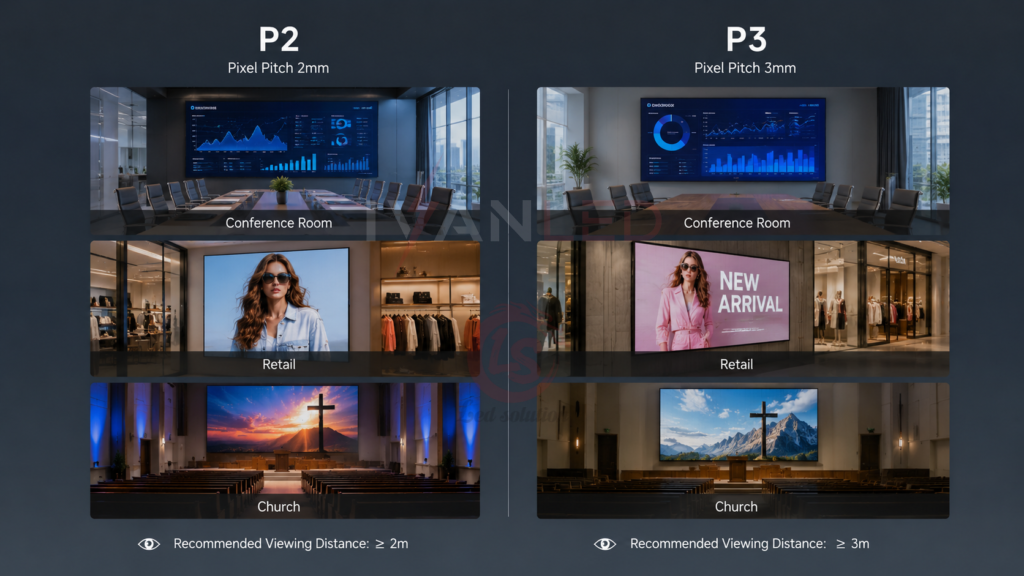
P2 and P3 LED screens serve similar applications but differ in viewing distance requirements. P2 is preferred for close viewing; P3 for medium viewing.
| Application | Recommended Pitch | Typical Viewing Distance | Why |
| Conference room | P2 | 2-4 meters | Close viewing, text clarity |
| Control room | P2 | 2-3 meters | Data visualization, fine detail |
| Broadcast studio | P2 | 2-4 meters | Camera recording, color accuracy |
| Luxury retail | P2 | 1-3 meters | Close customer viewing |
| Retail signage | P3 | 3-5 meters | Good balance of quality and cost |
| Corporate lobby | P3 | 3-6 meters | Medium viewing distance |
| Church | P3 | 4-8 meters | Wide seating, cost-effective |
| Event venue | P3 | 3-6 meters | Larger audience, reasonable cost |
For more on indoor display applications, see our commercial LED display solutions.
Expert Tips for Buyers
Tip 1: Calculate your viewing distance first.
Measure the distance from the screen to the closest viewer. If it is under 4 meters, consider P2. If it is over 4 meters, P3 is sufficient and more cost-effective.
Tip 2: Consider content type.
If you display detailed data, text, or fine graphics, P2 is recommended. For video and images, P3 often provides excellent quality at a lower cost.
Tip 3: Test with your actual content.
View both P2 and P3 screens with your actual content at your intended viewing distance. The difference may be invisible — or critical.
Tip 4: Order spare modules.
Order 5-10% spare modules with your initial purchase. LED batches change over time, and spare parts purchased later may not match.
Tip 5: Consider total cost of ownership.
P2 costs more upfront but may be necessary for close viewing. P3 costs less and may be sufficient for most applications. Calculate TCO before deciding.
Frequently Asked Questions (FAQ)
Which is better: P2 or P3 LED screen?
It depends on your viewing distance. P2 is better for close viewing (2-4 meters) where sharpness and detail matter. P3 is better for medium viewing (3-6 meters) where cost-effectiveness is important. At 4 meters, most people cannot distinguish P2 from P3.
What does P in P2 and P3 stand for?
P stands for “pixel pitch” — the distance between adjacent pixel centers, measured in millimeters. P2 means 2mm between pixel centers. P3 means 3mm. Smaller numbers mean higher pixel density and sharper images.
How much more does P2 cost than P3?
P2 screens typically cost 20-50% more than P3 screens of the same size. The exact price difference depends on brand, quality, and market conditions. The premium is only worth it if your viewing distance is under 4 meters.
Can I use P2 or P3 screens outdoors?
No. P2 and P3 are designed for indoor use with 800-1,200 nits brightness. Outdoor screens require 4,500+ nits and IP65+ weatherproofing. For outdoor applications, consider P5-P10 with higher brightness. See our indoor vs outdoor guide for more.
Does IvanLED offer both P2 and P3 LED screens?
Yes. IvanLED manufactures both P2 and P3 LED screens for indoor applications. Browse our LED display products or contact us to discuss your project requirements.
Conclusion: Choosing Between P2 and P3
Choosing between P2 and P3 LED screens comes down to viewing distance and budget. P2 delivers sharper images for close viewing (2-4 meters) at a premium cost. P3 provides excellent image quality for medium viewing (3-6 meters) at a more accessible price.
Our straightforward advice:
– For viewing distances under 4 meters: Choose P2 for the best image quality.
– For viewing distances over 4 meters: Choose P3 — it is cost-effective and visually indistinguishable.
– Test with your actual content at the intended viewing distance before deciding.
– Always order spare modules (5-10%) with your initial purchase.
At IvanLED, we manufacture both P2 and P3 LED screens for indoor applications.
Ready to choose the right pixel pitch for your project?
👉 Contact IvanLED for a free consultation and customized quote.