Buyer Pain Points: Wide Aspect Ratio Confusion in LED Projects
B2B buyers sourcing LED displays face these specific wide-aspect-ratio challenges:
- Content compatibility uncertainty – Will 21:9 or 32:9 content actually fit? How much content is native to these ratios?
- Cabinet efficiency questions – Do 21:9 and 32:9 require more cabinets or leave wasted space?
- Controller limitations – Not all LED controllers support ultra-wide resolutions.
- Installation complexity – Wider screens may require steel structures, rigging, or curved cabinet arrangements.
- Hidden costs – Ultra-wide ratios often require more cabinets, higher-spec controllers, and custom content creation.
At IvanLED, we help buyers match aspect ratio to content and application — from standard 16:9 to immersive 32:9.
Aspect Ratio Basics: What 16:9, 21:9, and 32:9 Mean for LED Displays
Aspect ratio is the proportional relationship between a screen’s width and height.
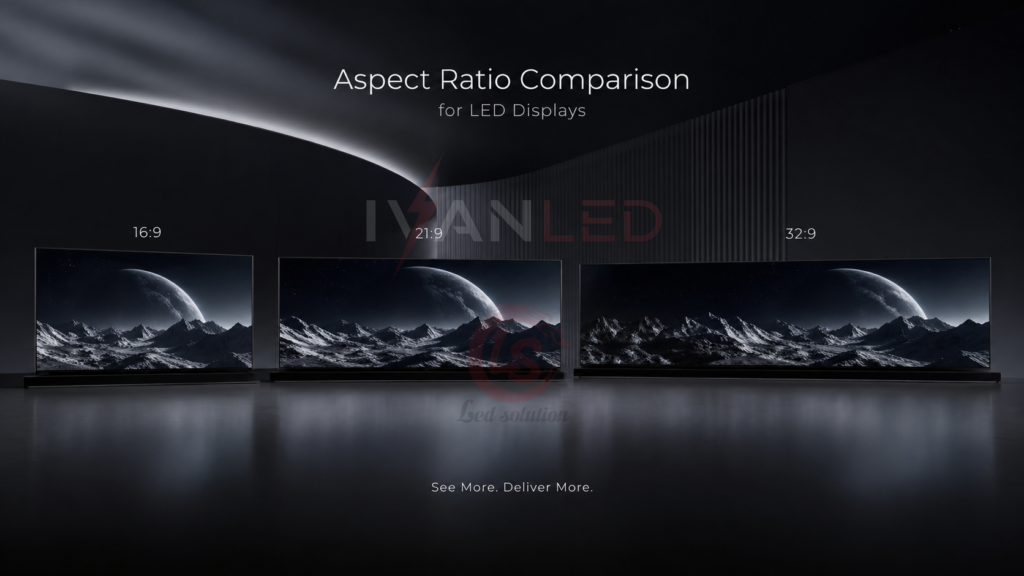
- 16:9 (1.78:1) – Width is 1.78 times height. The modern standard for most video content, TV broadcasts, and digital signage.
- 21:9 (2.33:1) – Width is 2.33 times height. Often called “ultra-wide.” Matches cinema movie aspect ratios. Increasingly used for immersive advertising and stage designs.
- 32:9 (3.56:1) – Width is 3.56 times height. Called “super ultra-wide.” Equivalent to two 16:9 screens side by side. Used for premium immersive experiences, data-heavy control rooms, and panoramic displays.
For LED displays, aspect ratio is achieved by arranging cabinets. All three ratios are achievable, but 21:9 and 32:9 require more cabinets horizontally and may need curved cabinet designs for optimal viewing.
16:9 vs. 21:9 vs. 32:9: Detailed Comparison for LED Displays
1. Visual Experience & Immersion
| Aspect Ratio | Visual Characteristic | Best For |
| 16:9 | Standard widescreen. Matches human horizontal field of view for typical room setups. | General signage, broadcast, corporate displays, churches. |
| 21:9 | Cinematic ultra-wide. Creates a panoramic, immersive feel. Requires viewers to sit further back or screens to be wider. | Immersive brand experiences, stage backdrops, high-end retail. |
| 32:9 | Extreme ultra-wide. Wraps around viewer’s peripheral vision when curved. Equivalent to two 16:9 screens side by side. | Data-intensive control rooms, panoramic digital signage, luxury lobbies, immersive art installations. |
2. Content Compatibility
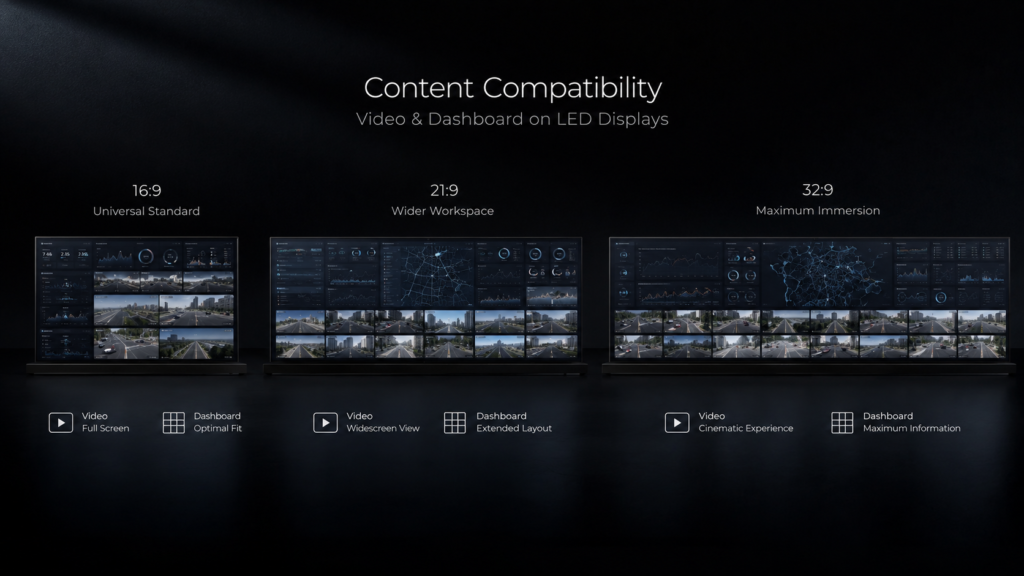
| Aspect Ratio | Video Content | PC Desktop / Dashboards | Live Camera Feeds |
| 16:9 | Native for 95%+ of content. Perfect fit. | Native for most laptops and media players. | Standard camera output matches perfectly. |
| 21:9 | Native for cinema movies. Most streaming video shows black bars or requires zoom/crop. | Requires custom dashboard design or processor scaling. | Widescreen cameras can be scaled, but typically with black bars on sides. |
| 32:9 | Very rare. Almost all video will show black bars or be stretched/distorted. | Requires purpose-built content or advanced processor with multi-window capabilities. | Only with specialized multi-camera processors or windowing. |
Critical takeaway: 21:9 and 32:9 are not plug-and-play. For most commercial LED applications, sticking with 16:9 is the safest and most compatible choice. Invest in ultra-wide only when the application specifically demands it and you have a content plan.
3. LED Cabinet Configuration & Efficiency
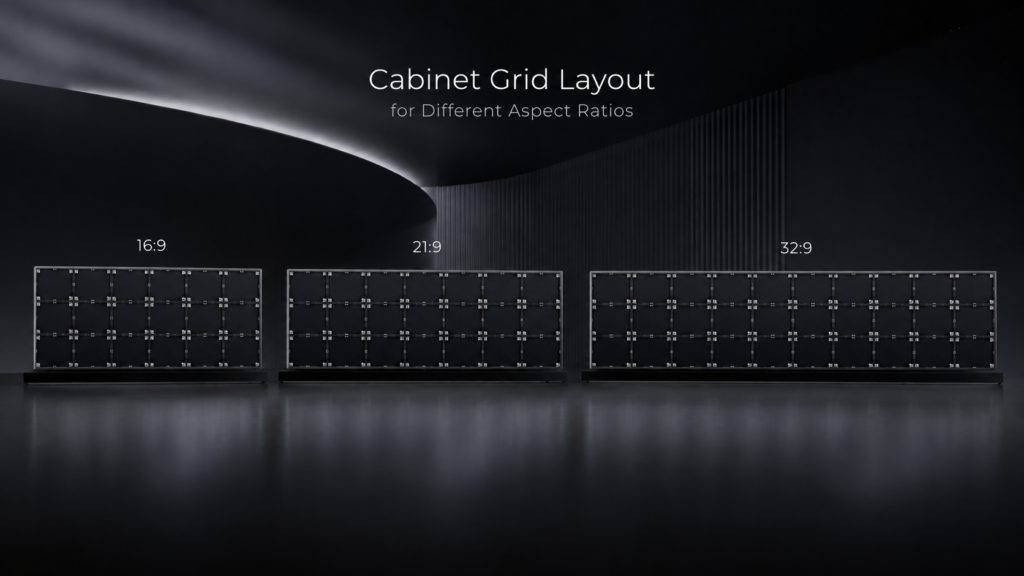
Using standard 500×500mm cabinets as an example:
| Aspect Ratio | Example Cabinet Grid | Total Cabinets | Approx. Screen Dimensions |
| 16:9 | 16 wide × 9 high | 144 | 8.0m wide × 4.5m high |
| 21:9 | 21 wide × 9 high | 189 | 10.5m wide × 4.5m high |
| 32:9 | 32 wide × 9 high | 288 | 16.0m wide × 4.5m high |
Cost implication: 32:9 requires twice the cabinets of 16:9 for the same height, meaning roughly double the screen cost, plus more powerful controllers and cabling. Ultra-wide is a significant investment.
4. Controller & Processing Requirements
| Aspect Ratio | Controller Requirement | Bandwidth | Typical Use Case |
| 16:9 | Standard controller (e.g., Nova H2/H5) | Baseline | Most commercial projects |
| 21:9 | Higher-spec controller or multiple synchronized units | ~1.3x 16:9 bandwidth | Premium retail, immersive stages |
| 32:9 | Multiple controllers or enterprise-grade processor | ~2x 16:9 bandwidth. May require fiber. | High-end control rooms, panoramic installations |
5. Cost Differences
For a fixed screen height (e.g., 4.5m), the cost comparison is roughly:
- 16:9 (8m wide): Baseline cost (1x)
- 21:9 (10.5m wide): ~1.3–1.5x the cost of 16:9 (more cabinets, processing)
- 32:9 (16m wide): ~2–2.5x the cost of 16:9 (double cabinets, premium controllers, often curved)
Hidden cost note: Ultra-wide ratios often require curved cabinet designs for optimal viewing at the edges. Curved cabinets add 20–50% to standard cabinet costs.
Application Guide: Which Aspect Ratio for Your LED Project?
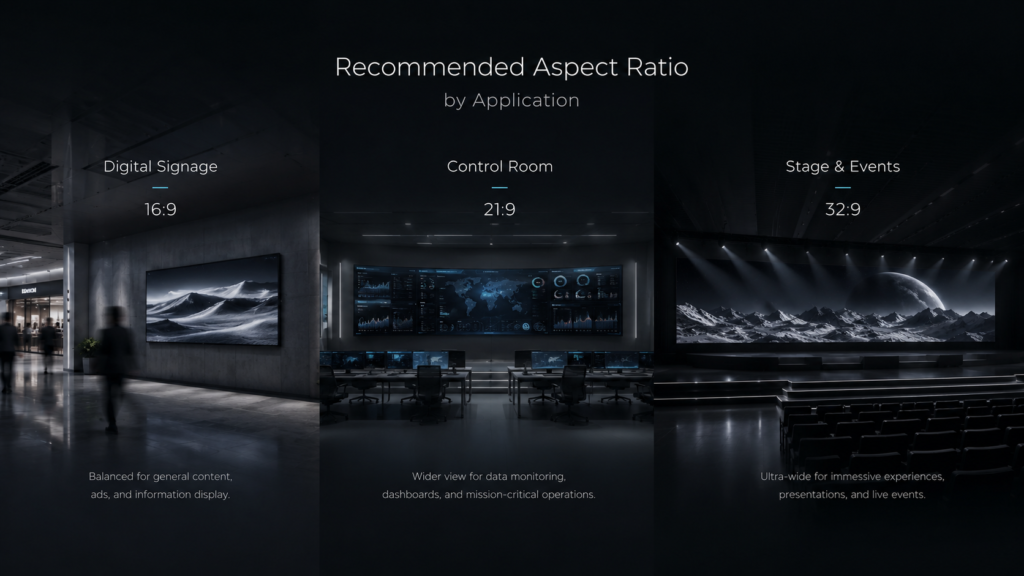
| Application | Recommended Ratio | Why |
| Digital signage (retail, malls, airports) | 16:9 | All signage content is created for 16:9. 21:9 or 32:9 would require custom content creation — expensive and unnecessary. |
| Church / worship center (lyrics, sermons) | 16:9 | Standard video and presentation formats are 16:9. Wider ratios create black bars or require reformatting slides. |
| Corporate lobby / reception (brand video) | 16:9 | Brand videos are almost always 16:9. Stick with standard. |
| High-end retail / flagship store (immersive) | 21:9 or 32:9 | Creates a wow factor and differentiates the space. Requires custom content budget. |
| Event stage / concert backdrop | 16:9 or custom wide | 16:9 is standard. For premium productions, custom wide ratios (e.g., 21:9, 32:9, or even taller) create dramatic stage presence. |
| Control room / NOC (data-heavy) | 16:9 or 32:9 | 16:9 with QHD/4K is common. 32:9 can show many data streams side-by-side without bezels. Requires purpose-built dashboard software. |
| Broadcast studio background | 16:9 | Broadcast standard is 16:9. Custom ratios cause framing problems for cameras. |
| Art installation / museum display | Any (21:9, 32:9, custom) | Custom ratios are common. Content is created specifically for the installation, so compatibility is not an issue. |
| Trade show booth | 16:9 | Most exhibitors bring 16:9 content. Wider screens may cause compatibility issues with shared content. |
Ultra-Wide LED Displays: Special Considerations
Curved vs. Flat
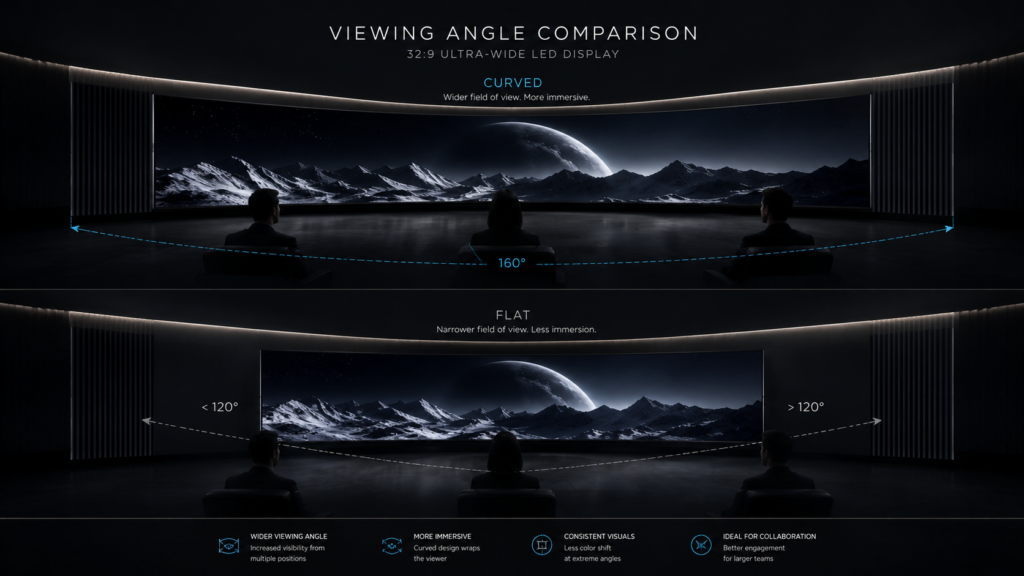
For 32:9 and very wide 21:9 screens, curved cabinets are strongly recommended. Without curvature, viewers at the edges see distorted, dimmer images. Curved LED displays require special cabinet designs, are more expensive, and need precise structural engineering.
Content Creation for Ultra-Wide
Do not assume you can “stretch” 16:9 content to fit 21:9 or 32:9. Stretched content looks amateurish. Instead, budget for custom content creation:
- 21:9 video content: $5,000–$20,000+ depending on length/complexity
- 32:9 interactive or data content: $10,000–$50,000+
Viewer Positioning
Ultra-wide screens require careful placement. The best viewing position is at the center, far enough back to see the entire width without excessive head turning. For 32:9, the optimal viewing distance is typically 1.5–2x the screen height.
Common Wide-Aspect-Ratio Mistakes with LED Displays
- Choosing 32:9 without a content plan – A beautiful screen with no content that fits it is useless. Develop content before purchasing.
- Stretching 16:9 content – Distorted images look unprofessional and damage brand perception.
- Ignoring controller limitations – Many standard LED controllers do not support 32:9 resolutions. Verify first.
- Forgetting about viewer position – A flat 32:9 screen viewed from the side looks terrible. Curved cabinets are often necessary.
- Under-budgeting for processing – Driving ultra-wide resolutions requires powerful controllers, multiple sending cards, and often fiber optic cabling. These costs add 20–50% to the project.
Expert Tips from 10+ Years in LED Displays
Tip 1: For 90% of commercial LED projects, 16:9 is the right choice.
Digital signage, churches, corporate lobbies, trade shows, and broadcast all default to 16:9. Only choose 21:9 or 32:9 when the application specifically demands immersion or multi-window data.
Tip 2: Test your actual content before committing to ultra-wide.
Bring your videos, dashboards, and presentations to a demo. See how they look on 21:9 and 32:9 screens. The results may surprise you — often, they do not work well without custom work.
Tip 3: Budget for content creation, not just the screen.
A $50,000 32:9 LED screen is useless without $10,000–$30,000 of custom content. Include content in your project budget from the start.
Tip 4: For 32:9, demand curved cabinets and a site survey.
Ensure the supplier provides a curved cabinet solution and that your structural engineer confirms the wall or rigging can support the weight and curvature.
Tip 5: Consider 16:9 with a multi-window processor instead of 32:9.
If you need to show multiple data streams, a 16:9 screen with a 2×2 or 3×3 window processor may be more flexible, cost-effective, and content-compatible than a 32:9 screen.
Frequently Asked Questions (FAQ)
Q1: What is the best aspect ratio for an LED display?
For 90% of applications (digital signage, churches, corporate, trade shows, broadcast), 16:9 is the best choice. It matches almost all content, is cabinet-efficient, and has the lowest cost. Only choose 21:9 or 32:9 for specific immersive or data-intensive applications with a custom content budget.
Q2: Can I play 16:9 content on a 21:9 or 32:9 LED display?
Yes, but it will show black bars on the sides (pillarboxing) or be stretched/distorted if you force full-screen. For professional installations, black bars are acceptable; stretching is not. The best solution is to create or source content natively in the screen’s aspect ratio.
Q3: Is 32:9 worth the extra cost for LED displays?
Only for specific applications: data-heavy control rooms that need to show many streams simultaneously, immersive art installations, or premium brand experiences with custom content. For general use, 32:9 adds 2x the cost for questionable benefit. Always justify with a clear content and ROI plan.
Q4: Does IvanLED support curved 21:9 or 32:9 LED displays?
Yes. We manufacture curved LED cabinets in custom radii. We also provide full engineering support, including structural calculations and controller configuration for ultra-wide aspect ratios.
Q5: How do I create content for a 21:9 or 32:9 LED display?
For video: edit in 21:9 (2560×1080 or 3440×1440) or 32:9 (3840×1080 or 5120×1440) timelines in software like Premiere Pro, DaVinci Resolve, or After Effects. For data dashboards: work with your software vendor to create custom resolutions. Many enterprise dashboard tools support custom aspect ratios.
Q6: What is the difference between 21:9 and 32:9 for LED displays?
21:9 is cinematic ultra-wide, roughly 2.33× wider than tall. 32:9 is super ultra-wide, roughly 3.56× wider than tall — equivalent to two 16:9 screens side by side. 32:9 is wider, more expensive, harder to drive, and has even less native content than 21:9.
Conclusion: 16:9, 21:9, or 32:9?
Your decision flowchart:
- What is your primary content?
- Standard video, presentations, signage → 16:9
- Cinema movies, custom immersive content → Consider 21:9
- Multi-data dashboards, panoramic art → Consider 32:9
- Do you have a budget for custom content?
- No → 16:9 (using existing content)
- Yes → 21:9 or 32:9 are possible
- Will cameras record the screen?
- Yes → 16:9 (broadcast standard)
- No → Any ratio possible
- What is your budget?
- Standard → 16:9
- Premium → Consider 21:9 or 32:9 with content
IvanLED’s straightforward advice for 2026:
– For 90% of commercial LED projects: 16:9 is the safe, cost-effective, content-compatible choice.
– For premium immersive experiences with custom content budgets: 21:9 offers cinematic impact without extreme cost or complexity.
– For data-heavy control rooms or panoramic installations with dedicated content: 32:9 creates impressive multi-window displays, but budget double for screen, processing, and content.
At IvanLED, we provide transparent aspect ratio recommendations based on your content, application, and budget — not just what looks impressive on a spec sheet.
Ready to specify the right aspect ratio for your LED display project?
👉 Contact IvanLED with your content types and application for a free recommendation.