Refresh Rate Basics: What Hz Means for LED Displays
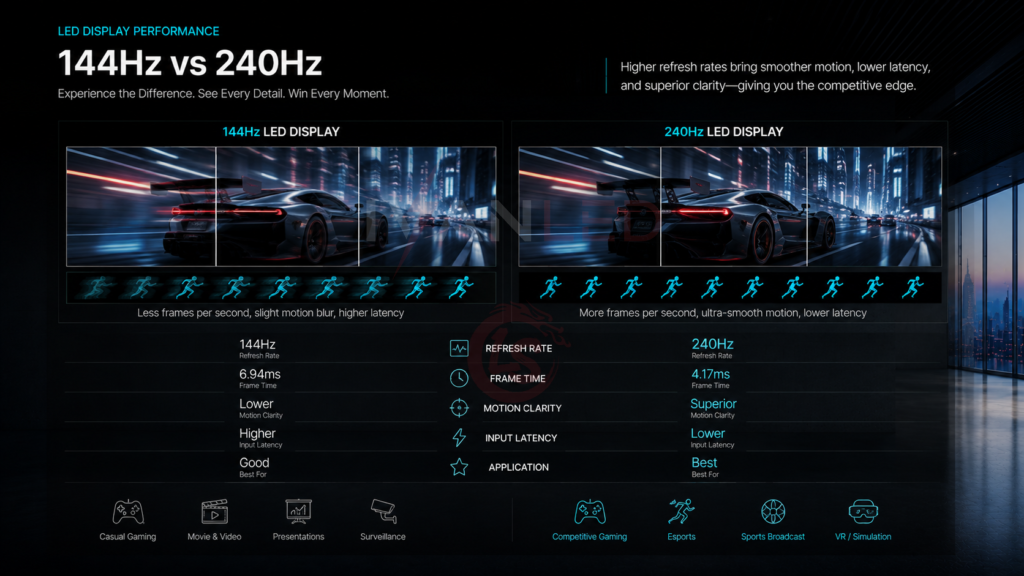
Refresh rate, measured in Hertz (Hz), is the number of times per second an LED display updates its image. A 144Hz display refreshes 144 times per second; a 240Hz display refreshes 240 times per second.
For LED displays, refresh rate is controlled by the receiving card and driver IC. Not all LED controllers or cabinets support high refresh rates. Always verify compatibility before purchasing.
Buyer Pain Points: High Refresh Rate Confusion
B2B buyers sourcing high-refresh-rate LED displays face specific challenges:
- Over-specification – Paying for 240Hz when 144Hz would look identical for their application.
- Under-specification – Buying 144Hz for slow-motion broadcast, resulting in flicker on camera.
- Controller compatibility – Not all LED controllers support 240Hz output.
- Hidden costs – Higher refresh rates require more powerful receiving cards and processing.
- Marketing confusion – Some suppliers advertise “high refresh rate” without specifying whether they mean 120Hz, 1,920Hz, or 3,840Hz.
At IvanLED, we help buyers match refresh rate to actual content and camera requirements — not just sell the highest number.
144Hz vs. 240Hz: The Real Difference for LED Displays
1. Visual Smoothness (Human Eye Perception)
For live viewing by the human eye, the difference between 144Hz and 240Hz is minimal. Most people cannot perceive flicker above 90–120Hz. Motion appears smooth on both.
- 144Hz – Already exceeds what most viewers can distinguish.
- 240Hz – Only noticeable in extremely fast motion or for sensitive individuals.
Conclusion for live events: Both are excellent. 144Hz is sufficient for virtually all live audiences.
2. Camera Recording & Broadcast (The Critical Difference)
This is where 240Hz can provide a real advantage. When cameras record LED displays, the refresh rate interacts with the camera’s shutter speed.
| Refresh Rate | Camera Compatibility | Risk of Flicker |
| 144Hz | Good for normal-speed video (24fps, 30fps, 60fps) | Low for standard broadcast |
| 240Hz | Excellent for high-speed and slow-motion recording | Very low, even at 120fps+ recording |
Key takeaway: If your LED display will be recorded by cameras, especially for slow-motion replays, 240Hz provides a larger safety margin against flicker.
3. Latency & Input Lag
For interactive applications like esports stages or virtual production, lower latency matters. Higher refresh rates reduce the time between source input and screen display.
| Refresh Rate | Typical Latency (Source to Screen) | Best For |
| 144Hz | 6–8ms | Most live events, standard esports |
| 240Hz | 3–5ms | Professional esports, high-end virtual production |
For professional esplayers or VR applications, the lower latency of 240Hz can be noticeable. For general use, it is not.
4. Cost Difference
240Hz LED displays are significantly more expensive than 144Hz:
- 144Hz – Available on mid-to-high-end LED cabinets. Small price premium over standard (60–120Hz).
- 240Hz – Requires premium driver ICs and receiving cards. Typically 20–50% more expensive than equivalent 144Hz cabinets.
Application Guide: Do You Need 144Hz or 240Hz?
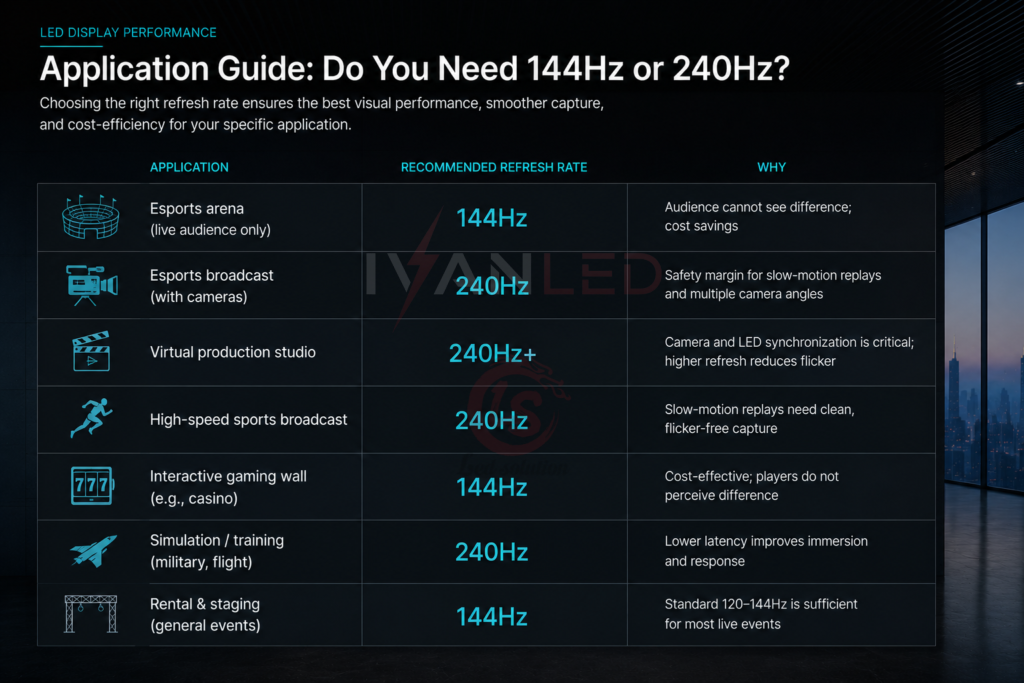
| Application | Recommended Refresh Rate | Why |
| Esports arena (live audience only) | 144Hz | Audience cannot see difference; cost savings |
| Esports broadcast (with cameras) | 240Hz | Safety margin for slow-motion replays and multiple camera angles |
| Virtual production studio | 240Hz+ | Camera and LED synchronization is critical; higher refresh reduces flicker |
| High-speed sports broadcast | 240Hz | Slow-motion replays need clean, flicker-free capture |
| Interactive gaming wall (e.g., casino) | 144Hz | Cost-effective; players do not perceive difference |
| Simulation / training (military, flight) | 240Hz | Lower latency improves immersion and response |
| Rental & staging (general events) | 144Hz | Standard 120–144Hz is sufficient for most live events |
Common Mistakes When Choosing High Refresh Rate LED Displays
- Buying 240Hz for live audience only – Wasted budget. Viewers cannot distinguish above 120Hz.
- Assuming all controllers support 240Hz – Many standard controllers max out at 120–144Hz. Verify before purchase.
- Ignoring camera compatibility – 144Hz may flicker on certain camera shutter speeds. Test with your actual cameras.
- Forgetting about cable bandwidth – 240Hz at 4K requires high-bandwidth cables and processors.
- Overlooking receiving card limits – Even if the cabinet supports 240Hz, the receiving card may not.
Expert Tips from 10+ Years in LED Displays
Tip 1: Test with your cameras before finalizing refresh rate.
Bring your actual broadcast or slow-motion cameras to a demo. Test 144Hz and 240Hz at the shutter speeds you will use. The difference may be invisible or critical — test don’t assume.
Tip 2: For esports, focus on latency reduction, not just Hz.
240Hz helps, but total system latency (source → processor → controller → screen) matters more. Ask suppliers for end-to-end latency specs.
Tip 3: Do not ignore the receiving card.
A 240Hz cabinet paired with a 120Hz receiving card will only output 120Hz. Confirm that all components (cabinet, receiving card, sending card, controller) support your target refresh rate.
Tip 4: For virtual production, consider 3,840Hz+.
144Hz and 240Hz are for niche applications. High-end virtual production and broadcast often use 1,920Hz–3,840Hz to eliminate camera flicker entirely. Do not assume 240Hz is the highest you can go.
Tip 5: Budget for processing power.
Driving 240Hz at 4K resolution requires significantly more processing power than 144Hz. Your media server and cabling must be capable. This is often overlooked.
Frequently Asked Questions
Q1: Can the human eye tell the difference between 144Hz and 240Hz on an LED display?
For live viewing, almost no. Most people cannot perceive flicker above 90–120Hz. The difference between 144Hz and 240Hz is only noticeable in very fast motion or for a small percentage of sensitive individuals. For general audiences, both appear equally smooth.
Q2: Is 240Hz worth the extra cost for esports LED displays?
It depends. For live audience only: no, 144Hz is sufficient. For broadcast with slow-motion replays: yes, 240Hz provides a safety margin against camera flicker. For professional players competing on-screen: the lower latency of 240Hz can be beneficial but is often marginal.
Q3: Do all LED controllers support 240Hz?
No. Many standard LED controllers max out at 120Hz or 144Hz. 240Hz requires premium controllers and receiving cards. Always confirm controller compatibility before purchasing high-refresh-rate cabinets.
Q4: What refresh rate is best for virtual production?
High-end virtual production typically uses 1,920Hz–3,840Hz, not 144Hz or 240Hz. These higher rates eliminate camera flicker entirely. For entry-level virtual production, 240Hz can work, but test thoroughly with your specific cameras.
Q5: Can I upgrade a 144Hz LED display to 240Hz later?
Possibly, but not guaranteed. Upgrading requires replacing the receiving cards and potentially the driver ICs on each cabinet. In most cases, it is more cost-effective to buy the correct refresh rate upfront. Ask your supplier if future upgrade is supported.
Q6: Does IvanLED offer both 144Hz and 240Hz LED displays?
Yes. We manufacture LED cabinets with refresh rates from 60Hz to 3,840Hz. We help buyers select based on application — live audience, broadcast, esports, or virtual production — and provide full controller compatibility verification.
Conclusion: 144Hz or 240Hz?
Your decision flowchart:
- Will cameras record the screen?
- No → 144Hz is sufficient (save your budget)
- Yes → Continue to question 2
- Will you use slow-motion replay (120fps+)?
- No → 144Hz is likely sufficient
- Yes → Consider 240Hz for safety margin
- Is this for professional esports or virtual production?
- No → 144Hz is fine
- Yes → 240Hz or higher recommended
IvanLED’s straightforward advice:
– For 90% of high-refresh-rate applications (esports live audience, rental, events): 144Hz is cost-effective and sufficient.
– For broadcast with slow-motion, professional esports, or virtual production: 240Hz provides valuable safety margin.
– Always test with your actual cameras before finalizing.
At IvanLED, we provide transparent refresh rate recommendations based on your application — not just the highest number.
Ready to specify the right refresh rate for your LED display project?
👉 Contact IvanLED with your application and camera requirements for a free recommendation.