Buyer Pain Points: Aspect Ratio Confusion in LED Projects
B2B buyers sourcing LED displays face these specific aspect-ratio challenges:
- Content mismatch – The screen is installed, but content looks stretched, cropped, or has black bars.
- Uncertain future use – Will the same screen need to show different aspect ratio content later?
- Legacy system compatibility – Replacing an old 4:3 screen with a 16:9 screen may require expensive software reconfiguration.
- LED cabinet limitations – Not all aspect ratios are equally cost-effective to build with standard LED cabinets.
- Supplier confusion – Many LED suppliers assume 16:9 is always correct, but control rooms and monitoring applications may need 4:3 or custom ratios.
At IvanLED, we help buyers match aspect ratio to content and application — not just default to “what everyone uses.”
What Is Aspect Ratio?
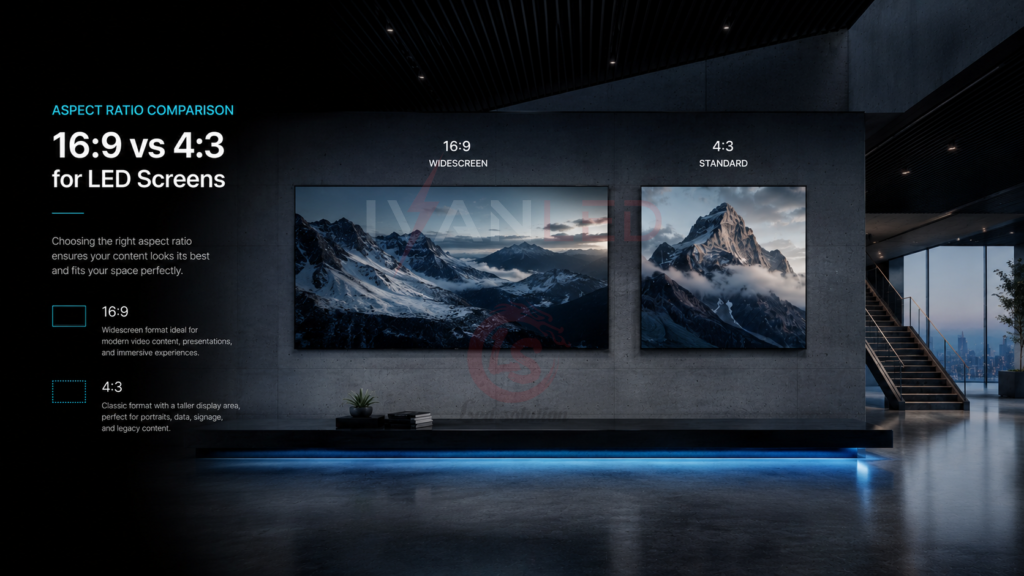
Aspect ratio is the proportional relationship between a screen’s width and height, expressed as W:H.
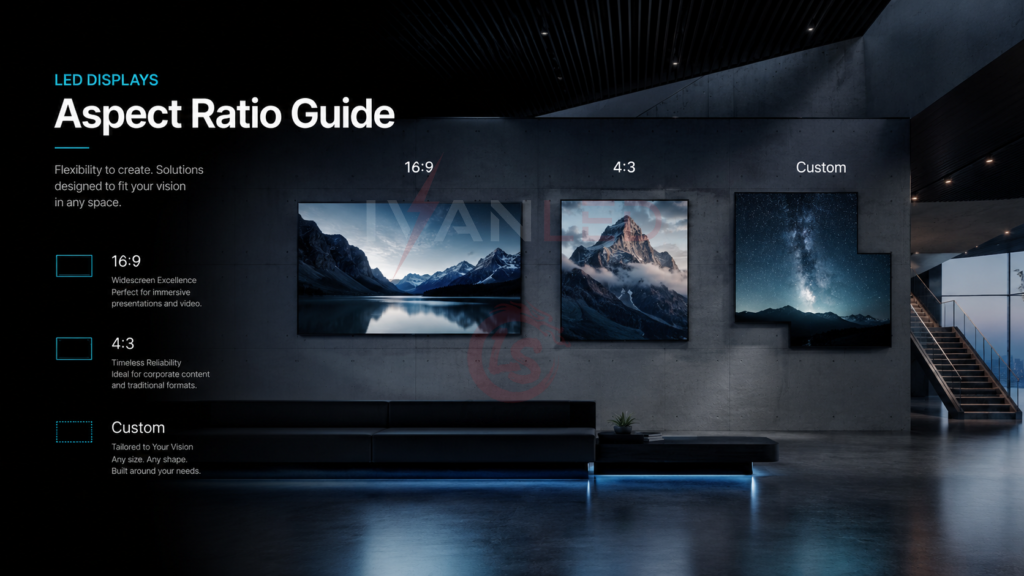
- 16:9 (1.78:1) – Width is 1.78 times height. Modern widescreen standard for most video content, TV broadcasts, and digital signage.
- 4:3 (1.33:1) – Width is 1.33 times height. Closer to a square. Used in older video formats, legacy control rooms, and some monitoring systems.
- Custom ratios – e.g., 21:9 (ultra-wide), 32:9 (super ultra-wide), 9:16 (vertical), 1:1 (square).
For LED displays, aspect ratio is achieved by arranging cabinets (typically 500×500mm or 640×640mm) in a specific grid. Because LED is modular, any aspect ratio is technically possible. However, some ratios are more cabinet-efficient than others.
16:9 – The Modern Standard for LED Displays
16:9 is the default choice for the vast majority of LED display applications. Here is why.
Why 16:9 Dominates
- Content compatibility – Almost all modern video (YouTube, broadcast, streaming, PowerPoint) is native 16:9. No black bars, no cropping, no stretching.
- Broadcast standard – HD, Full HD, 4K, and 8K are all based on 16:9.
- LED cabinet efficiency – 16:9 grids use whole numbers of cabinets (e.g., 16 wide × 9 high).
- Viewer expectation – Audiences expect widescreen. 4:3 looks dated.
Best Applications for 16:9 LED Displays
| Application | Why 16:9 Is Recommended |
| Digital signage (retail, malls, airports) | All signage content is created for 16:9. 4:3 looks outdated. |
| Event / stage background | Matches camera sensors and broadcast outputs. No letterboxing. |
| Church / worship center | Lyrics, sermon slides, and video clips are all 16:9 standard. |
| Trade show booth | Standard video content, easy to source and display. |
| Conference room / meeting room | Laptops and projectors use 16:9; compatibility is key. |
| Broadcast studio background | Broadcast standard is 16:9 for HD and 4K. |
| Education / classroom | Modern teaching content assumes widescreen format. |
16:9 Cabinet Efficiency Example
Using standard 500×500mm cabinets:
- 16 cabinets wide × 9 cabinets high = 144 cabinets total
- Screens measures 8m wide × 4.5m high
- No partial cabinets, no wasted space
4:3 – When and Why It Still Matters
4:3 is an older aspect ratio that was standard for televisions and computer monitors before the mid-2000s. For most new LED projects, 4:3 is not recommended. However, there are specific scenarios where 4:3 is necessary.
When to Use 4:3 for LED Displays
| Scenario | Why 4:3 Is Needed |
| Legacy control room replacement | Existing SCADA, monitoring, or dashboard software is hard-coded for 4:3. Changing to 16:9 requires expensive software rework. |
| Security monitoring (older camera systems) | Older CCTV systems output 4:3. Upgrading cameras may be cost-prohibitive. |
| Matching existing screens in a video wall | If you are adding to an existing 4:3 wall, new screens must match the aspect ratio. |
4:3 Cabinet Efficiency
Using standard 500×500mm cabinets:
- 8 cabinets wide × 6 cabinets high = 48 cabinets total
- Screens measures 4m wide × 3m high
- Also cabinet-efficient, but less common today
Content Compatibility Challenges with 4:3
- Modern 16:9 video on a 4:3 screen shows black bars top and bottom (letterboxing).
- Most PowerPoint templates are now 16:9 by default; reformatting required.
- Future content will almost certainly be 16:9. A 4:3 screen will require ongoing content adaptation.
IvanLED recommendation: Only choose 4:3 if you are replacing an existing 4:3 system and cannot change the software. For new projects, always choose 16:9.
Custom Aspect Ratios for LED Displays
One of the biggest advantages of LED over LCD is the ability to create custom aspect ratios at reasonable cost.
Common Custom Ratios and Their Applications
| Aspect Ratio | Common Name | Best For | Cabinets |
| 9:16 | Vertical | Retail digital signage, train stations, social media walls | 9 high × 16 wide (rotated orientation) |
| 21:9 | Ultra-wide | Creative stage designs, immersive experiences, panoramic advertising | 21 wide × 9 high |
| 32:9 | Super ultra-wide | High-end events, control rooms with multiple data streams | 32 wide × 9 high |
| 1:1 | Square | Art installations, Instagram-focused displays, some retail | 8 wide × 8 high |
Custom Ratio Considerations
- Cabinet count – Very wide ratios (e.g., 32:9) require many cabinets. Confirm total cost before committing.
- Controller compatibility – Some LED controllers have maximum width limits. Ask your supplier: “Can your controller support my custom ratio?”
- Content creation – Custom ratios require custom content. You cannot use standard 16:9 videos. Budget for content creation.
- Video processor needed – For custom ratios, a high-quality video processor is essential to handle scaling and aspect ratio conversion.
How to Choose Aspect Ratio for Your LED Project
Your decision flowchart:
- Step 1: Identify your primary content sources
What aspect ratio are your videos, dashboards, and presentations? Collect 20–30 typical files and check. - Step 2: Consider legacy constraints
Are you replacing an existing system? If yes, what aspect ratio does the old system use? Changing ratios may require software rework. - Step 3: Define the application
Digital signage? 16:9. Control room? Check existing system. Event stage? Consider custom wide ratio. - Step 4: Ask supplier for cabinet grid and controller compatibility
Confirm your chosen ratio is cabinet-efficient and controller-supported. - Step 5: Budget for content and processing
Custom ratios need custom content. Mixed content needs a video processor.
Quick Recommendation Table
| Application | Recommended Aspect Ratio | Priority |
| Digital signage (retail, malls, airports) | 16:9 | Must |
| Event stage background | 16:9 or custom wide | Recommend |
| Church / worship center | 16:9 | Must |
| Trade show booth | 16:9 | Recommend |
| Control room (modern system) | 16:9 | Recommend |
| Control room (legacy system) | Match existing (often 4:3) | Must |
| Security monitoring (old cameras) | Match existing (often 4:3) | Consider |
| Creative stage / immersive experience | 21:9 or 32:9 | Optional |
| Vertical digital signage | 9:16 | Optional |
What Happens When Aspect Ratio Mismatches?
When content aspect ratio does not match screen aspect ratio, three things can happen:
1. Black Bars (Letterboxing / Pillarboxing)
- 16:9 content on a 4:3 screen – Black bars top and bottom.
- 4:3 content on a 16:9 screen – Black bars left and right.
- You lose usable screen area. On a large LED wall, this wasted space is expensive.
2. Cropping
- The system zooms to fill the screen, cutting off edges.
- You lose critical content like subtitles, data in corners, or speaker faces.
3. Stretching / Distortion
- The system forces content to fit by stretching horizontally or vertically.
- Circles become ovals; people look distorted. Looks amateurish.
Best practice: Always match screen aspect ratio to your primary content. For mixed content, choose 16:9 (most flexible) or use a video processor that handles multiple ratios.
Common Aspect Ratio Mistakes with LED Displays
- Defaulting to 16:9 without checking legacy systems – If replacing a 4:3 control room, 16:9 may require expensive software rework.
- Choosing 4:3 for digital signage – Content looks dated. 16:9 is the modern standard.
- Assuming any aspect ratio is equally easy for LED – Some ratios require more cabinets or custom controllers. Ask for cabinet grid count.
- No video processor for mixed content – If you show multiple aspect ratios, you need a processor. Many buyers forget this.
- Forgetting about vertical space needs – For document-heavy applications, 4:3 or 1:1 may actually be better. Do not blindly choose 16:9.
Expert Tips from 10+ Years in LED Displays
Tip 1: Inventory your existing content before choosing aspect ratio.
Collect 20–30 typical files you will display. Check their aspect ratios. If 90% are 16:9, choose 16:9. If 50% are 4:3, reconsider or budget for a processor.
Tip 2: For future-flexibility, choose 16:9 and buy a good video processor.
A processor can scale, crop, or add black bars to display any content on a 16:9 screen. Costs $500–$2,000 but saves you from being locked into one ratio.
Tip 3: For control rooms, measure your existing dashboard before buying.
Many legacy SCADA systems are designed for 4:3. Switching to 16:9 may require expensive software reconfiguration. Check with your IT team first.
Tip 4: For custom ratios, ask for a content demo before finalizing.
A reputable LED supplier will run your actual content on a test screen at the proposed aspect ratio. Do not guess — test.
Tip 5: For LED video walls showing mixed content, use a 16:9 screen with a 4:3-safe zone.
Design your content so critical information stays in a central 4:3 area. Then 16:9 content can use the full width without hiding data.
Frequently Asked Questions
Q1: What is the best aspect ratio for an LED display?
For 90% of applications (digital signage, events, churches, trade shows, retail), 16:9 is the best choice. It matches almost all modern content, is cabinet-efficient, and meets viewer expectations. Only choose 4:3 if you have a legacy system that cannot be changed.
Q2: Can an LED display be built in a custom aspect ratio?
Yes. Because LED displays are modular, you can create any width-to-height ratio by arranging cabinets. Custom ratios like 21:9 (ultra-wide), 32:9, 9:16 (vertical), and 1:1 (square) are common. However, custom ratios may require more cabinets and a compatible controller. Always ask your supplier for a cabinet grid layout.
Q3: What happens if I play 4:3 content on a 16:9 LED display?
Three options: (1) Black bars on left and right (pillarboxing) – preserves original aspect ratio but wastes screen area. (2) Cropping – zooms to fill screen, cuts off top and bottom. (3) Stretching – distorts image horizontally. Most users choose black bars, but a video processor can manage this intelligently.
Q4: Is 4:3 obsolete for LED displays?
For most new projects, yes. 4:3 is only recommended when replacing an existing 4:3 system where the software cannot be updated. For new installations, always choose 16:9. 4:3 content will become increasingly rare, and you will constantly fight compatibility issues.
Q5: Do I need a special controller for custom aspect ratios?
Possibly. Some LED controllers have maximum width or height limits. For very wide ratios like 32:9, you may need a higher-end controller or multiple controllers synchronized together. Always confirm controller compatibility before finalizing your aspect ratio.
Q6: Does IvanLED support custom aspect ratios?
Yes. We build LED displays in any aspect ratio: 16:9, 4:3, 1:1, 21:9, 32:9, 9:16, and fully custom. We provide cabinet grid layouts, controller compatibility verification, and content testing before shipment.
Conclusion: Your Aspect Ratio Decision Checklist
Before finalizing your LED display aspect ratio, answer these questions:
- What aspect ratio is 90% of my existing content? (Match this)
- Am I replacing a legacy system? (Match existing ratio)
- Will I ever show mixed aspect ratio content? (Budget for a video processor)
- Is my chosen ratio cabinet-efficient? (Ask supplier for grid count)
- Does my controller support the ratio? (Confirm before ordering)
IvanLED’s straightforward advice for 2026:
– For 85% of applications (digital signage, events, churches, retail, trade shows): Choose 16:9. It is the modern standard, content is everywhere, and it is cabinet-efficient.
– For legacy control room replacements: Match existing ratio (often 4:3). Changing ratios may cost more in software than hardware.
– For creative/immersive installations: Consider custom ratios (21:9, 32:9, 9:16). Just budget extra for custom content and controller verification.
At IvanLED, we help buyers match aspect ratio to content and application. We do not assume “one size fits all.”
Ready to specify the right aspect ratio for your LED display project?
👉 Contact IvanLED with your content types and application for a free recommendation.