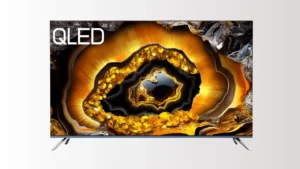
What does 1080p Resolution Mean?
1080p resolution usually refers to a Full HD (FHD) standard, which has 1920 pixels horizontally and 1080 pixels vertically, totaling approximately 2.07 million pixels. The ‘p’ in 1080p stands for Progressive Scan, meaning the image is displayed line by line, with all 1080 horizontal lines shown in each frame. With progressive scan, motion images are less likely to exhibit ghosting or jitter.
What is the Image Quality Level of 1080p Resolution?
For medium and small screens up to 60 inches, 1080p provides clear image details and sufficiently rich visual depth, at a normal viewing distance of 2–3 meters, individual pixels are almost invisible. If you want a screen for close viewing and of moderate size, 1080p is fully sufficient for your needs.
In terms of color performance, 1080p supports a full HD color gamut, which meets the needs of most commercial, entertainment, and engineering applications. However, its resolution falls short for professional filming and video production.
Differences among 720p, 1080p, 1080i, 4K, and 8K resolutions
720p Resolution
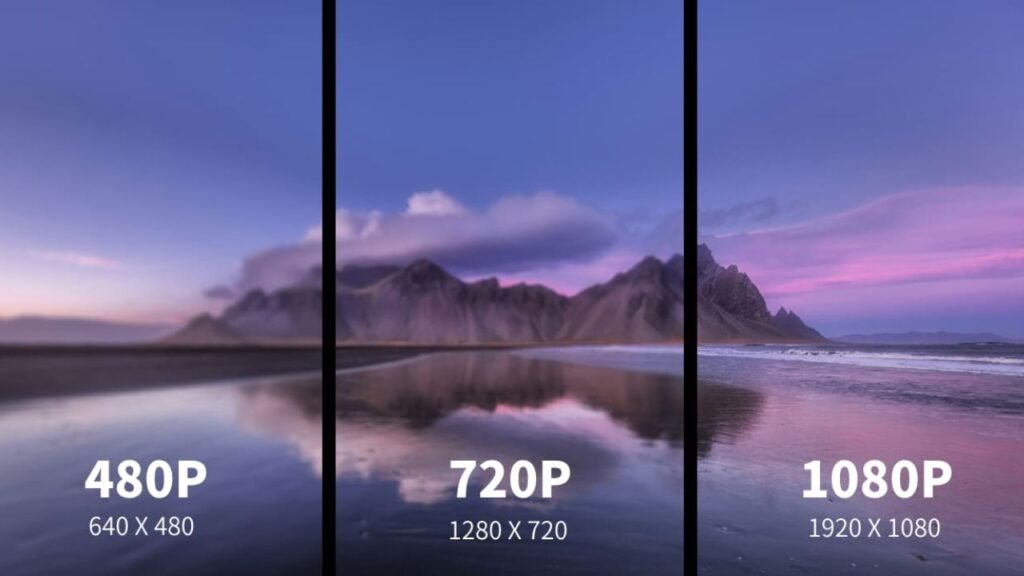
720p is a high-definition display resolution, part of the HD (High Definition) standard, with a resolution of 1280 × 720, totaling approximately 920,000 pixels.
720p also provides relatively high image clarity and rich details. When you watch videos on screens or laptops up to 30 inches, 720p performs very well. However, if you play 720p content on a larger screen, you will notice visible pixelation, which affects the viewing experience.
1080i Resolution
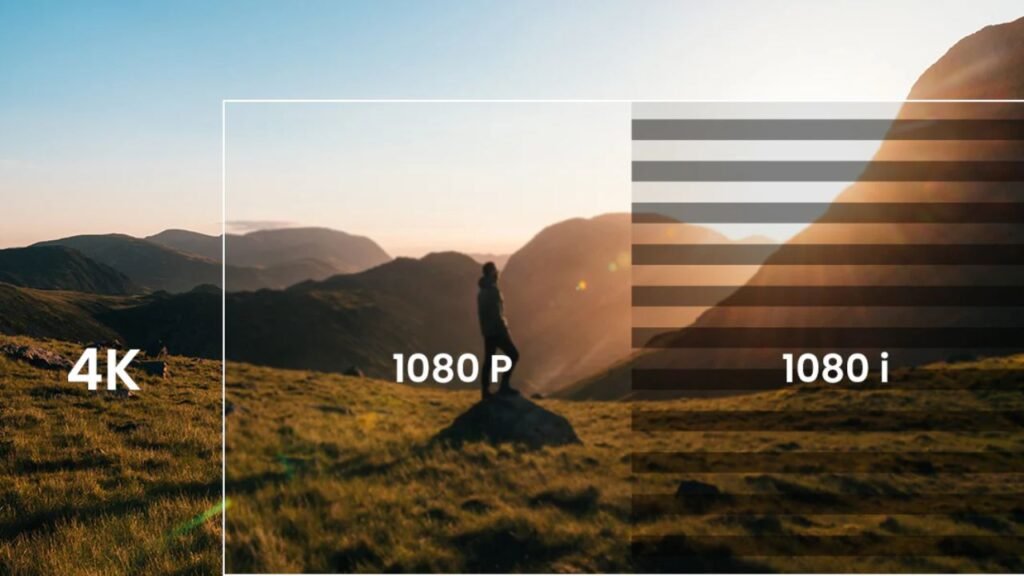
1080i is a Full HD resolution commonly used in early high-definition television (HDTV) broadcasts and some satellite TV and set-top box programs. It has the same number of pixels as 1080p, but uses interlaced scanning, where each frame displays only the odd or even lines, and two frames alternate to form a complete image.
Also, due to its scanning method, 1080i delivers clear static images, but motion scenes are slightly less smooth. Nowadays, 1080i has gradually been phased out, remaining mainly in some traditional satellite and cable TV broadcasts.
4k Resolution
4K, also known as Ultra High Definition (UHD), is an ultra-high-definition resolution standard. It typically has a resolution of 3840 × 2160, totaling approximately 8.29 million pixels, which is four times the number of pixels in 1080p. Compared to 1080p, 4K provides more detail and sharper image quality.
4K resolution ensures that even on 50–100 inch TVs or large projection screens, you can see the image remains clear, and the pixels are nearly invisible. It is commonly used in high-end TVs, monitors, and professional film production.
8k Resolution
8K resolution is currently the highest ultra-high-definition display standard on the market, featuring 7680 × 4320 pixels. It has four times the pixels of 4K and about 16 times those of 1080p. In terms of image quality, 8K is significantly more detailed than 4K, and if you want to view videos on large screens more than 100 inches, 8k is well-suited.
| Terms | 720p | 1080p | 1080i | 4k | 8k |
| Pixels | Approximately 920,000 | 2.07 million | 2.07 million | 8.29 million | 33.17 million |
| Richness of video resources | Few | Extremely abundant | Limited | Quite a few | Very few |
| Image quality | Average | High | High | Higher | Extremely high |
| Bandwidth requirements | Very low | Medium | Low | High | Extremely high |
| Usage scenario | Applications with higher stability demands | Most videos, images, and indoor displays | Traditional broadcasting systems | Some high-end scenarios | Technical demonstrations or customized content |
| Current market stage | Being phased out | Widely adopted stage | Being phased out | Technology development stage | Technology development stage |
Advantages of 1080p Resolution
Good Image Quality
For LED or LCD screens under 60 inches, 1080p already provides sufficient clarity, with performance almost indistinguishable from 4K. Moreover, 1080p also supports HDR10 and up to 10-bit color depth, offering high brightness, strong contrast between light and dark areas, and low noise, which will deliver you an immersive viewing experience.
A large amount of video content
1080p occupies a significant share of today’s entertainment market. Most of the videos on some streaming platforms, such as YouTube and Bilibili, support a maximum resolution of 1080p. Furthermore, nearly all games on major gaming platforms such as Steam, Epic, PlayStation, and Xbox support 1080p.
Mature Manufacturing Technology and Reasonable Price
Since the birth of 1080p resolution, it has occupied a large share of the LED display market. Therefore, Most manufacturers are familiar with the production of 1080p and have established standardized processes, and both manufacturing costs and retail prices have significantly decreased. Compared with 4K and 8K technologies, whose large-scale production process still needs to be optimized, 1080p has a significant competitive advantage.
Low Hardware Requirements
For CPUs, compared with higher resolutions, 1080p requires significantly less computation for image decoding, rendering, and color processing, allowing smooth playback on laptops, standard monitors, and mobile devices without overheating or frame drops.
In addition, 1080p videos occupy less memory and buffer space, which only requires minimal RAM for playback. For example, 4K or 8K videos may need 8GB or more, whereas 1080p typically only requires 2–4GB.
Low Network Bandwidth Requirements
Adequate bandwidth ensures smooth playback of videos and seamless operation of remote meetings. The typical bitrate for 1080p videos is around 4–8 Mbps. To ensure stable playback, a network bandwidth of approximately 8–10 Mbps is generally required, allowing smooth streaming even on medium to low-speed connections.
In contrast, a 4K video requires at least 30–50 Mbps of bandwidth to ensure smooth playback, demanding a very high-speed connection.
The Common Applications Scenarios of 1080p Resolution
TVs and Computer Monitors
Nowadays, 1080p is very common in TVs, smartphones, and monitors, and it is also commonly used in high-end products and premium brands. Due to the excellent cost-performance and sufficient clarity, 1080p is chosen by the majority of users.
Projectors
Not just LED screens, when choosing projectors, including home and educational models, most users prefer a resolution of 1920×1080. In terms of projectors, even on screens that are larger than 100 inches, Full HD can provide high clarity.
Photography and Video Production for Streaming Platforms
Because 1080p content doesn’t take up too much memory, most cameras and smartphones offer a photo clarity of up to 1080p. Also, on streaming platforms, video and blog creators tend to upload 1080p content because of its high clarity and high compatibility. For viewers, 1080p content can be played smoothly even with a network speed that is not particularly slow. All in all, you will hardly be restricted by resources when browsing videos when choosing 1080p.
Monitoring Display and Conference Display Screens
1080p resolution has a lot of details, an affordable cost, and relatively low bandwidth requirements. Therefore, it is widely used for many conference rooms and monitoring displays, such as residential communities and shopping malls.
In addition, many online conferencing platforms, such as Microsoft Teams and Zoom, also often display 1080p for video transmission.

Commercial Displays
Even today, 1080p is still widely used for commercial display applications, such as airport information boards and outdoor advertising displays. In contrast, although 720p requires less bandwidth, it always appears blurry on larger displays. 4K typically has significantly higher costs, and when the display screen is not large, its performance is almost no different from that of 1080p.
Other Key Factors Affecting Screen Performance
Refresh Rate
Refresh rate is the number of times a display refreshes the image per second; it is an index that can directly affect motion smoothness and visual experience. Generally, for everyday use, such as video playback or video conferencing, 60Hz is sufficient for most viewers. Sometimes, for professional gaming monitors, 120Hz and 144Hz are more suitable.
Pixel Pitch
The clarity of the image displayed on the screen is jointly determined by pixel pitch and resolution. Pixel pitch means the distance between the two nearest LED beads on the screen. The smaller the value, the more detailed the image is. In most LED displays, the pixel pitch typically ranges from P1 to P4. On Micro LED or Mini LED screens, pixel pitch will range from 0.01 mm to 0.2 mm.
HDR Performance
HDR stands for High Dynamic Range, which makes a display achieve higher contrast, richer colors, more detailed highlights and shadows, and a stronger visual impact. The HDRs are classified into HDR10, HDR10+, and Dolby Vision according to different display capabilities. Commonly, higher-end products will adopt better HDR standards.

720p, 1080p, 4K or 8K: How to Choose?
When You are a Retailer or a Brand Owner in the LED Display Industry
In terms of product positioning, if you want to focus on mainstream or cost-effective offerings, 1080p or 720p may be reasonable choices. If you prefer high-end or flagship products, 4K or even 8K resolutions should be taken into consideration.
From the perspective of procurement cost and sales volume, when your budget is limited, and you want a quick turnover, 1080p is suitable, then 720p is. If your budget is sufficient and you aim for higher profit margins, 4K is more appropriate.
If You Want to Purchase LED Screens for a Project
When you are buying LED displays for a project, the following factors need to be considered:
- Viewing distance: The closer the viewing distance, the more noticeable the pixels are to the human eye. When the screen is large and viewed up close, it is best to choose a higher resolution and smaller pixel pitch. Conversely, for distant viewing, a lower resolution is sufficient.
- Color performance: If your clients have high requirements for visual experience, it is wise for you to choose a high resolution and good HDR performance, such as 4k resolution. For the ones that do not need to perform well, such as outdoor advertising screens, a lower-resolution display is a more cost-effective choice.
- Hardware and content richness: If the video content you want to play has only 1080p resolution or lower, choosing a 4K display would be a bit excessive in performance. Moreover, 4K videos require higher network bandwidth when playing, and if the network cannot support it, the viewing experience of the image may be reduced.
- Purchase cost: 4K displays require higher procurement costs. If your budget is limited, 1080p or similar resolutions also provide an immersive experience for the viewers.
Development Trend in Resolution Development
In the short term of a few years, 4K technology is not yet fully mature; its prices will remain high, and typical network bandwidth and storage often cannot support 4K video playback smoothly. Therefore, 1080p remains a highly cost-effective choice.
However, in the long run, 4K and Micro LED technologies will become more mature, costs will drop significantly, and they will gradually replace 1080p. Moreover, higher levels of HDR and refresh rates will gradually replace the current mainstream options. Until then, LED screens will undoubtedly provide you with a more immersive experience.
FAQs
Can a 1080p display show 720p and 4K content?
When playing 720p content, a 1080p display will upscale it to 1080p to fill the entire screen. While the image remains clear, the level of detail is slightly lower than native 1080p.
For 4k content, a 1080p display can only perform upscaling, show the 1920×1080 portion, and the entire image will be compressed. The detail will be lost, and the overall sharpness is lower than that of native 4K.
Will 1080p be phased out in the market?
In the short term, over the next five to ten years, 1080p cannot be phased out. 1080p content is widely available, hardware requirements are low, and there are almost no drawbacks when viewed on medium or small screens. However, LED technology is still advancing, and when 4K LED screens become more affordable, the market share of 1080p screens may shrink.
Does 1080p support high refresh rates?
Yes. Typically, 1080p supports high refresh rates such as 60Hz, 120Hz, and 144Hz. However, frame drops may still occur if the monitor or device hardware is insufficient. High refresh rates like 120Hz and 144Hz provide extremely smooth motion, but you also need a high-end graphics card to play the content.
IvanLED: A Professional Manufacturer of 1080p LED Displays
If you want to procure or customize an LED screen with 1080p resolution, IvanLED is an excellent option. We specialize in LED displays of various sizes, shapes, and resolutions, and are experienced in any usage scenarios, including airport display screens, stage LED walls, and LED posters. IvanLED also has professional quality control and after-sales service teams to ensure your perfect purchasing experience. If you have any further questions, feel free to contact us!